


At the end of 2024, we published a blog about adversaries hiding callback phishing information in form fill fields (e.g. name, address, description) and then boosting their blast radius with distribution lists. The post – Callback phishing via invoice abuse and distribution list relays – explains how the attack works from setup to delivery.
These types of attacks have not stopped, if anything, they’ve only proliferated since that blog was written. This type of service abuse (a.k.a. Living Off Trusted Sites) has only expanded as adversaries have identified more and more services with auto-notifications that allow them to smuggle phishing payloads to targets.
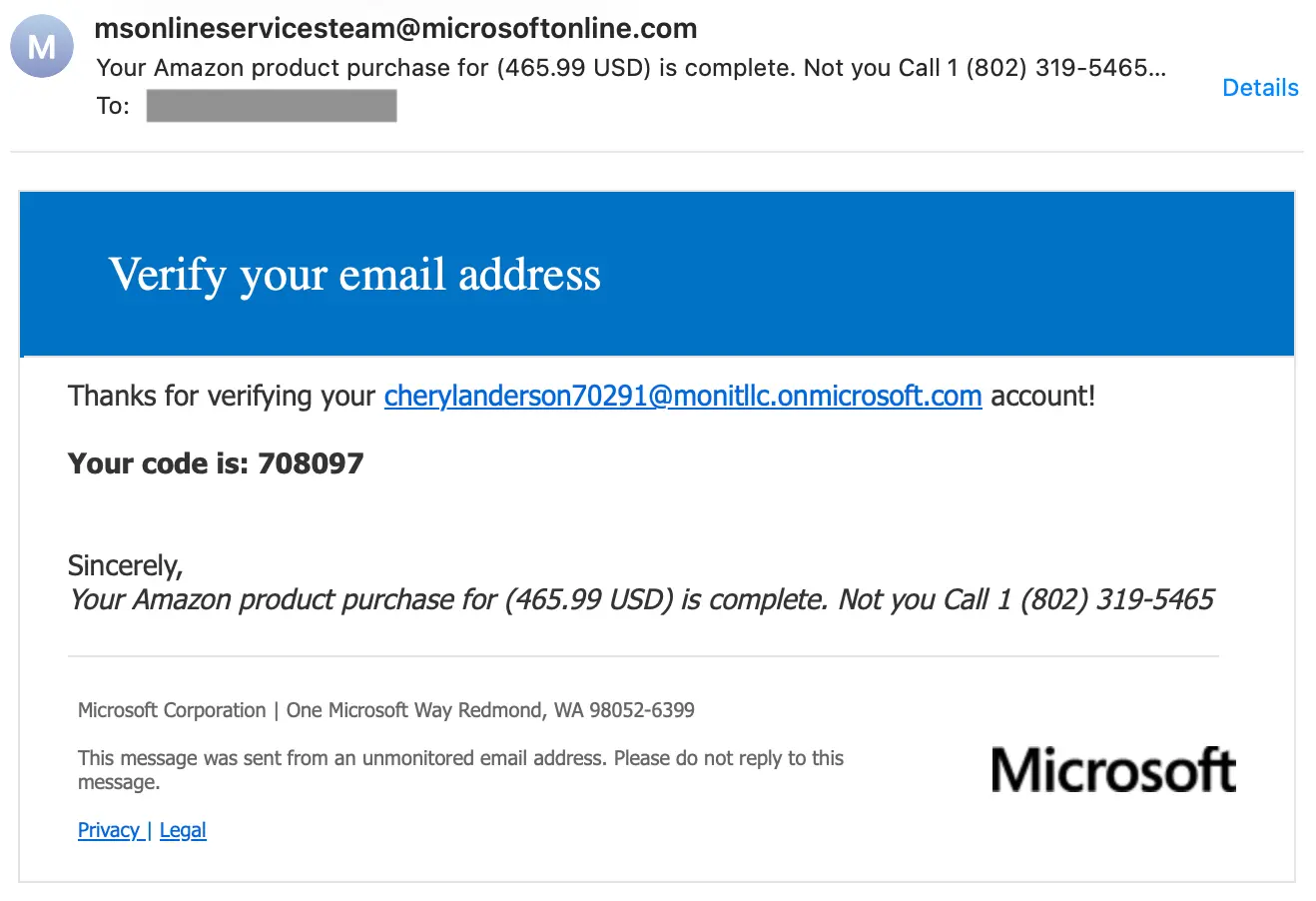
We even still see these attacks using Microsoft infrastructure, as reported in the 2024 blog. Here’s an example of a more modern take on the attack: an OTP notification that has the callback phishing in the organization name that is then distributed to targets.
Here are a few reasons why these attacks aren’t going away any time soon:
- The attacks evade security by being delivered over trusted (or benign) infrastructure that has most likely delivered non-malicious emails in the past.
- Distribution lists let attackers bypass sending limits, since only one notification is being sent from the service.
- Free trials are abundant and often provide full feature access for a limited time (which is long enough to attack).
- There are so many services to abuse, an adversary can move their attack playbook to a different cloud service as soon as the one they’re currently using cuts them off.
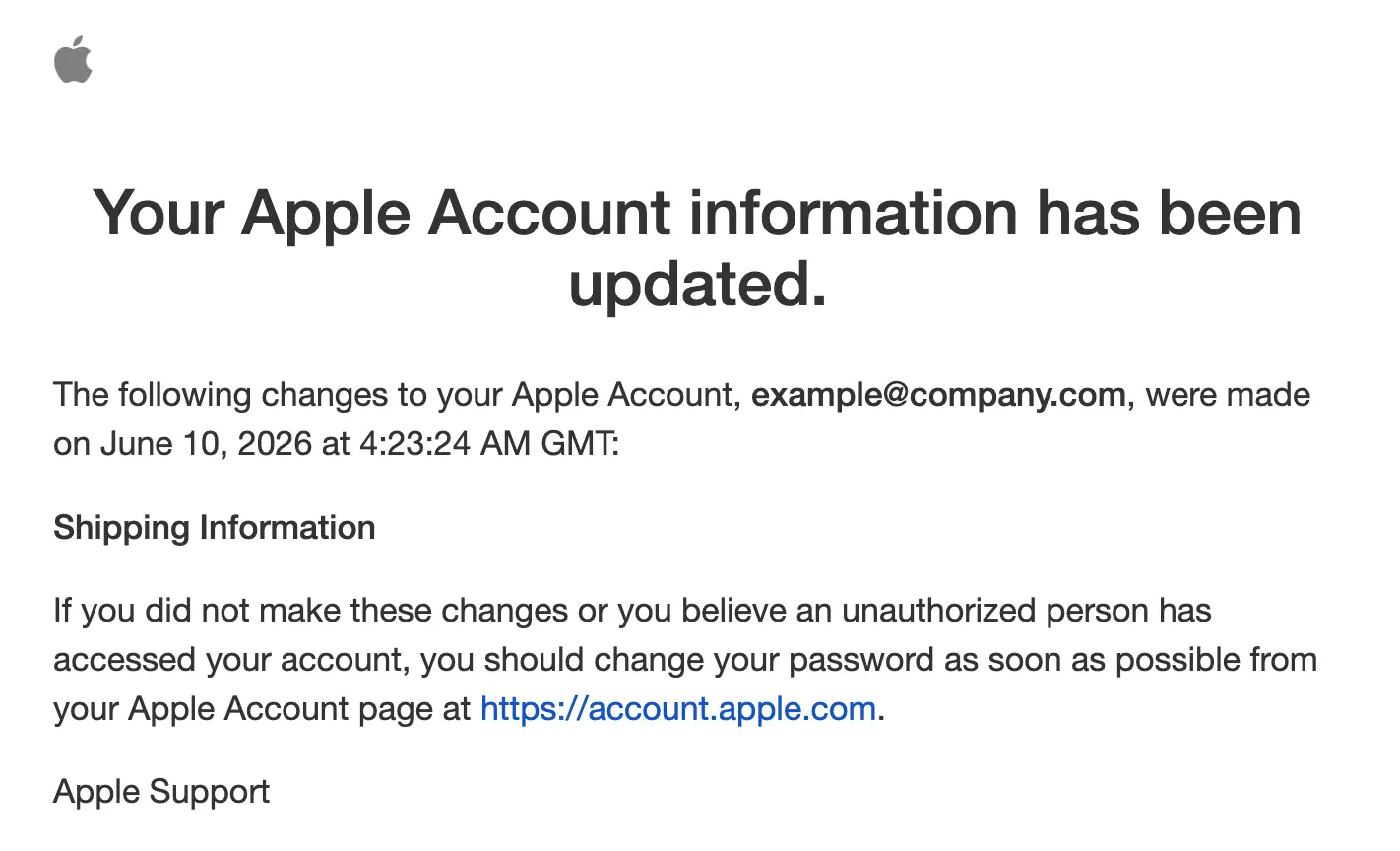
As an example of how a service provider can cut off attackers, take a look at this account update notification from Apple. In this attack, the adversary has put the callback payload in the Apple ID’s display name:
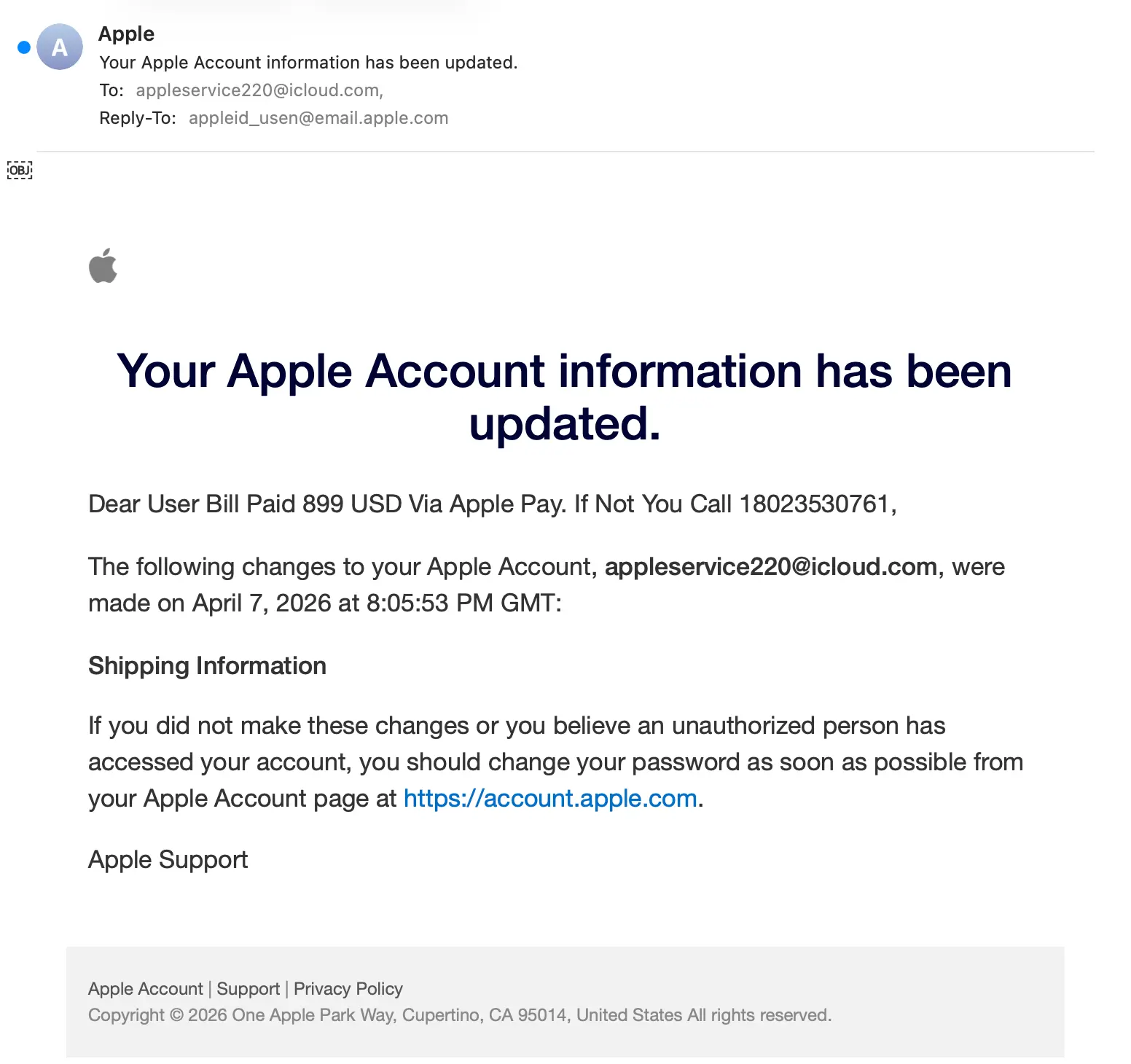
To get the callback phishing information into the message, the attacker just set the display name on the account to User Bill Paid 899 USD Via Apple Pay. If Not You Call 18023530761. Here’s an example of what that looks like:
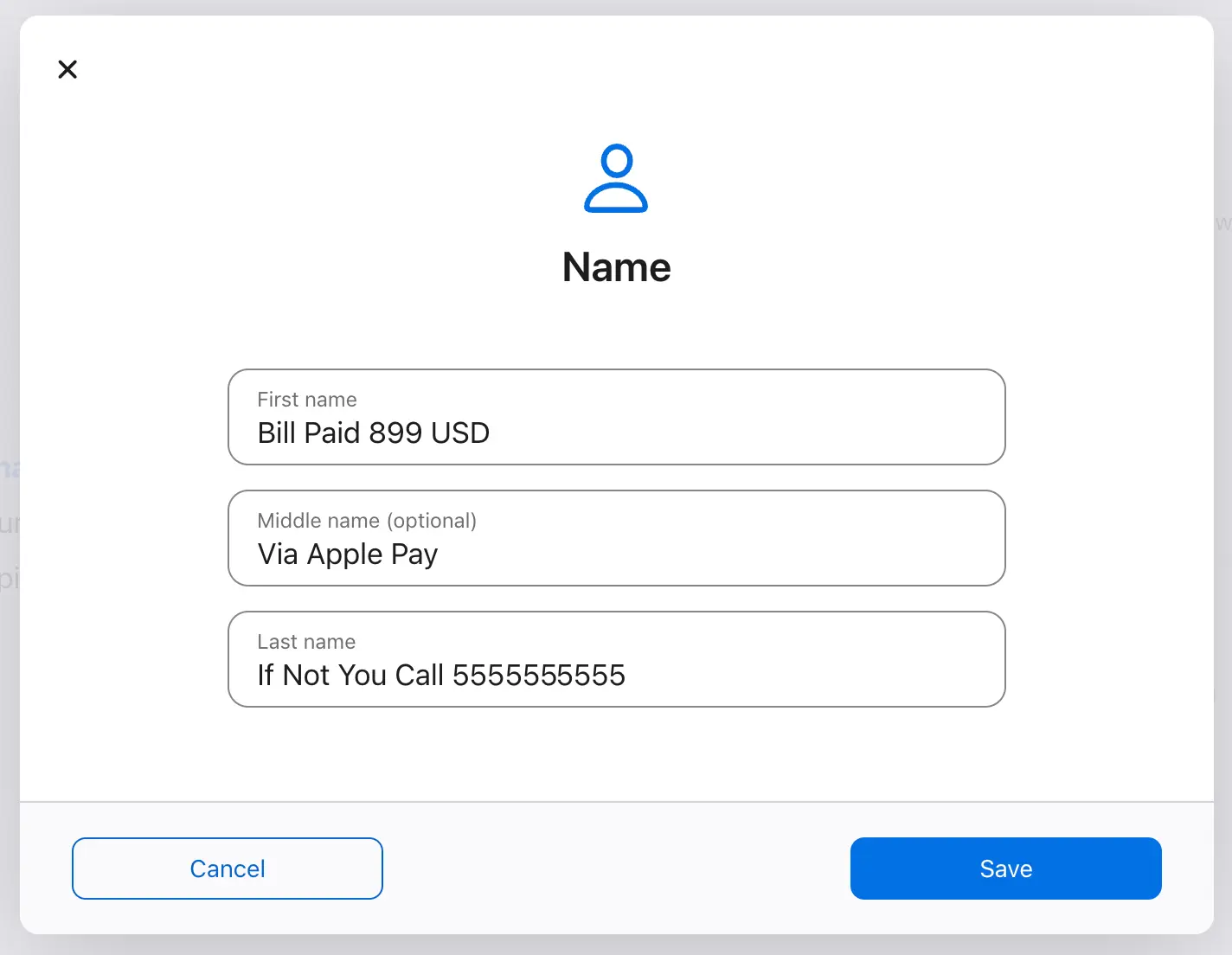
To launch the attack, the adversary updated the shipping information on the account. This generated a notification that was automatically sent to the email address of the account, which was a distribution list full of targets.
But this attack doesn’t work anymore. In the past few weeks, Apple closed this gap by updating the notification template that’s used when shipping information is updated to no longer start with Dear [display name],. Now this notification starts with The following changes... and never shows the display name.
That said, we’ve tested other automatic notifications from Apple, and some are still exploitable. So even when a service provider closes one gap, a few will likely remain open. We encourage all service providers to stay vigilant:
- Perform input validation on fields: Keeping out special characters isn’t enough. Ensure that text boxes are getting the correct type of value. AI can easily recognize when a name is a name and an address is an address.
- Remove unnecessary fields from email templates: If you only need an email address as an identifier, then only use the email address.
- Reduce the scope of features available in free trials: Most products can be thoroughly tested without sending outbound messages.
- Have a red team take a crack at exploiting your messages: It’s better to have a white hat find your weaknesses than a black hat.
Let’s take a look at some attacks we’ve recently seen.
Amazon & AWS
Amazon and AWS provide a wide range of services, just like the other major cloud providers. When services provide notification/alerting functionality, attackers will learn ways to exploit them for attacks. With Amazon/AWS, that means a lot of spots for attackers to potentially hide attacks. Let’s look at a couple services that may not be on your radar.
Amazon SNS
Amazon SNS (Simple Notification Service) is the service that sends messages from endpoints to other apps or users. Within Amazon SNS is the concept of a topic. A topic is a collection of endpoints and messages are sent by topic. In the attack below, we see an attacker putting their callback phishing payload within an Amazon SNS topic name:
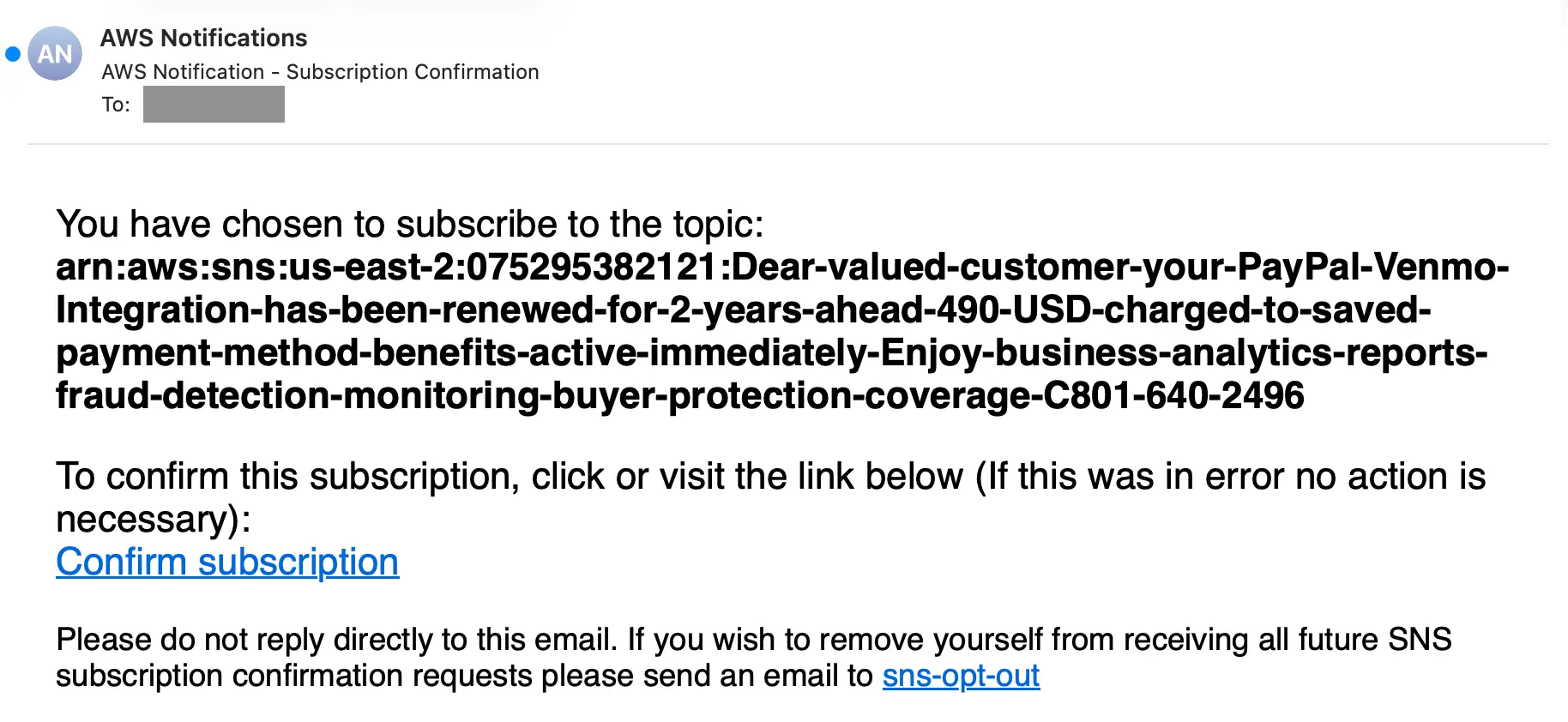
The bolded text is the topic’s full Amazon Resource Name (ARN), in the format of arn:aws:sns:[region]:[account ID]:[topic name]. To deliver their phishing payload, the attacker named their topic:
While the topic’s naming convention makes this a clumsy-looking attempt, the fact that the message is coming from Amazon means this message is more likely to be trusted by security systems. The attack is compromising on appearance for the sake of legitimate infrastructure.
By subscribing a distribution list to a topic, and not a list of individuals, the attacker is able to get around restrictions within Amazon SNS. Two important ones are:
- Exceeding the limit of 10 messages per second (TPS) for an email or email-json endpoint will trigger an automatic suspension of the subscription, placing it in a pending confirmation status.
- If a subscribed email address results in a bounce, the address is suppressed from further deliveries for 7 days.
With a distribution list, only one message is sent from Amazon SNS and the recipient address will never bounce since it’s attacker controlled.
Amazon Budgets
If an attacker wants to abuse an Amazon service, but have a nicer polish to the email, they can use Amazon Budgets notifications. Similar to the last attack, this method will not allow for spaces in the budget name, but the overall email will look more polished.
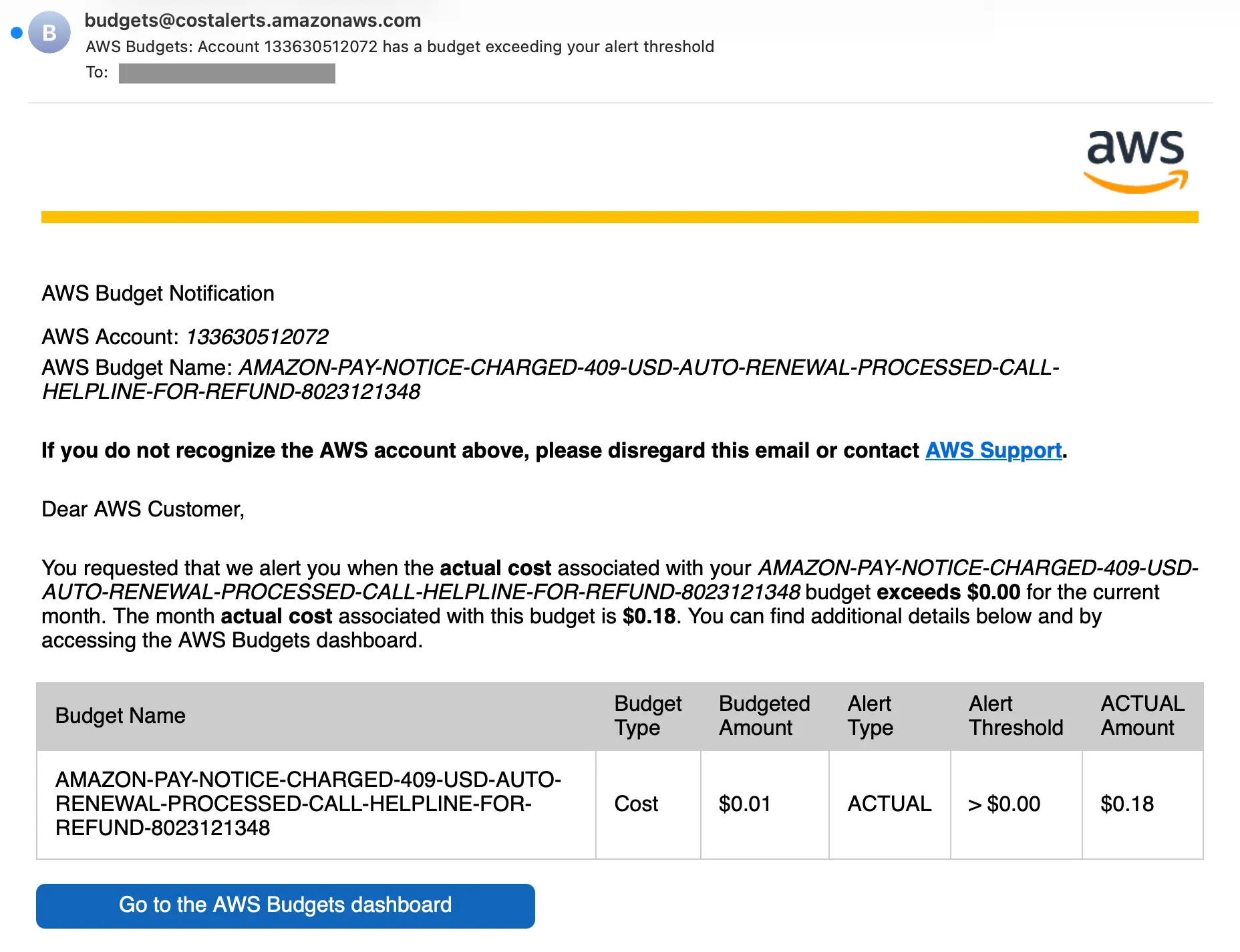
To launch this attack, the adversary set up a new budget, set an alert threshold of >$0.00, and then spent $0.18. This triggered a notification that was sent to a distribution list full of targets.
Grammarly
This example uses Grammarly Docs, but is very similar to attacks you’d see from a wide range of cloud-based collaboration tools that offer sharing functionality. This attack even uses the standard Norton subscription scam (alternative to the GeekSquad scam) where the target receives a receipt with callback information in it.
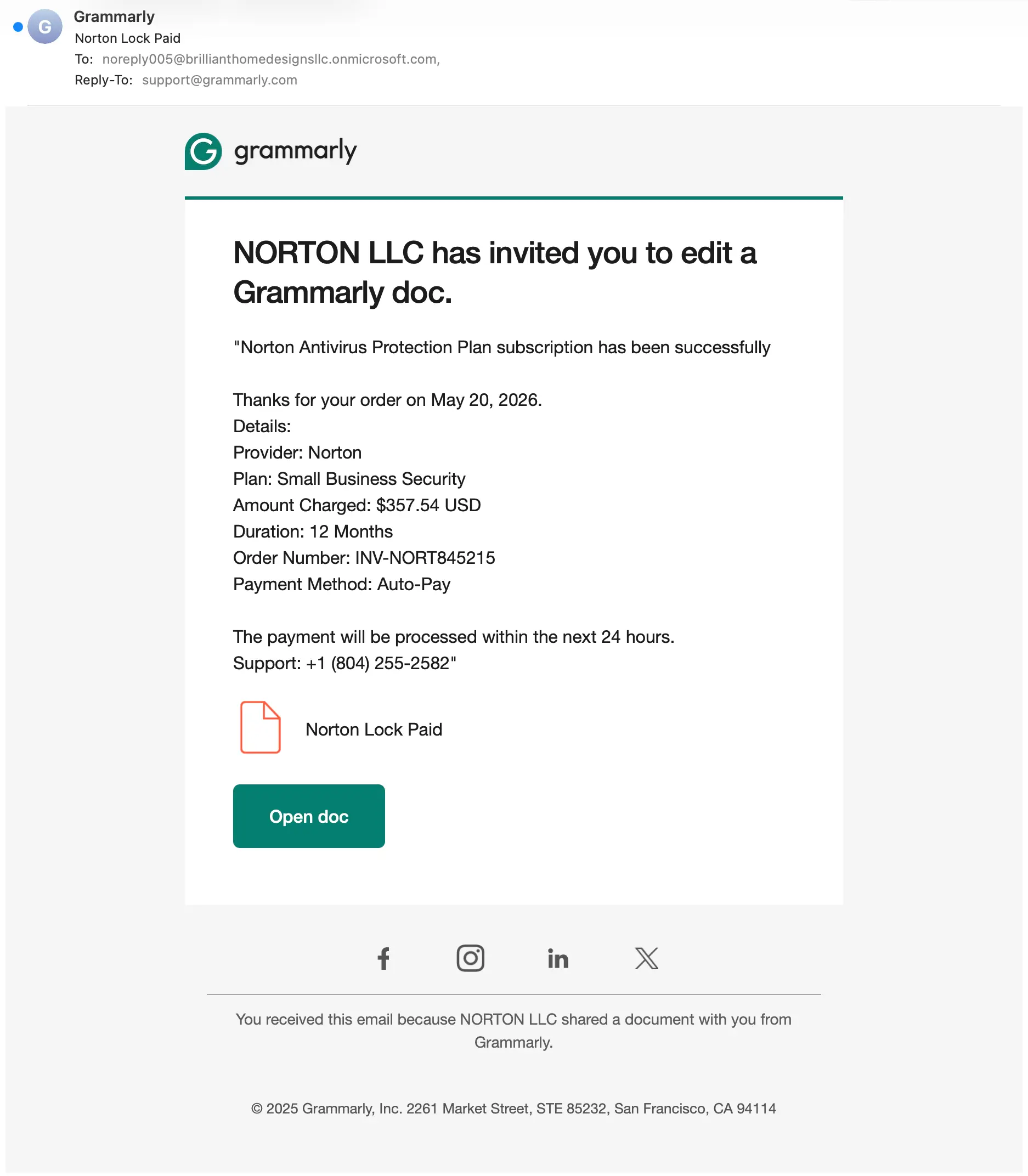
This one is way less sneaky than the AWS scams. Since this is a document share, Grammarly provides a full description field for the attacker to deliver the payload. Here’s what it would look like:
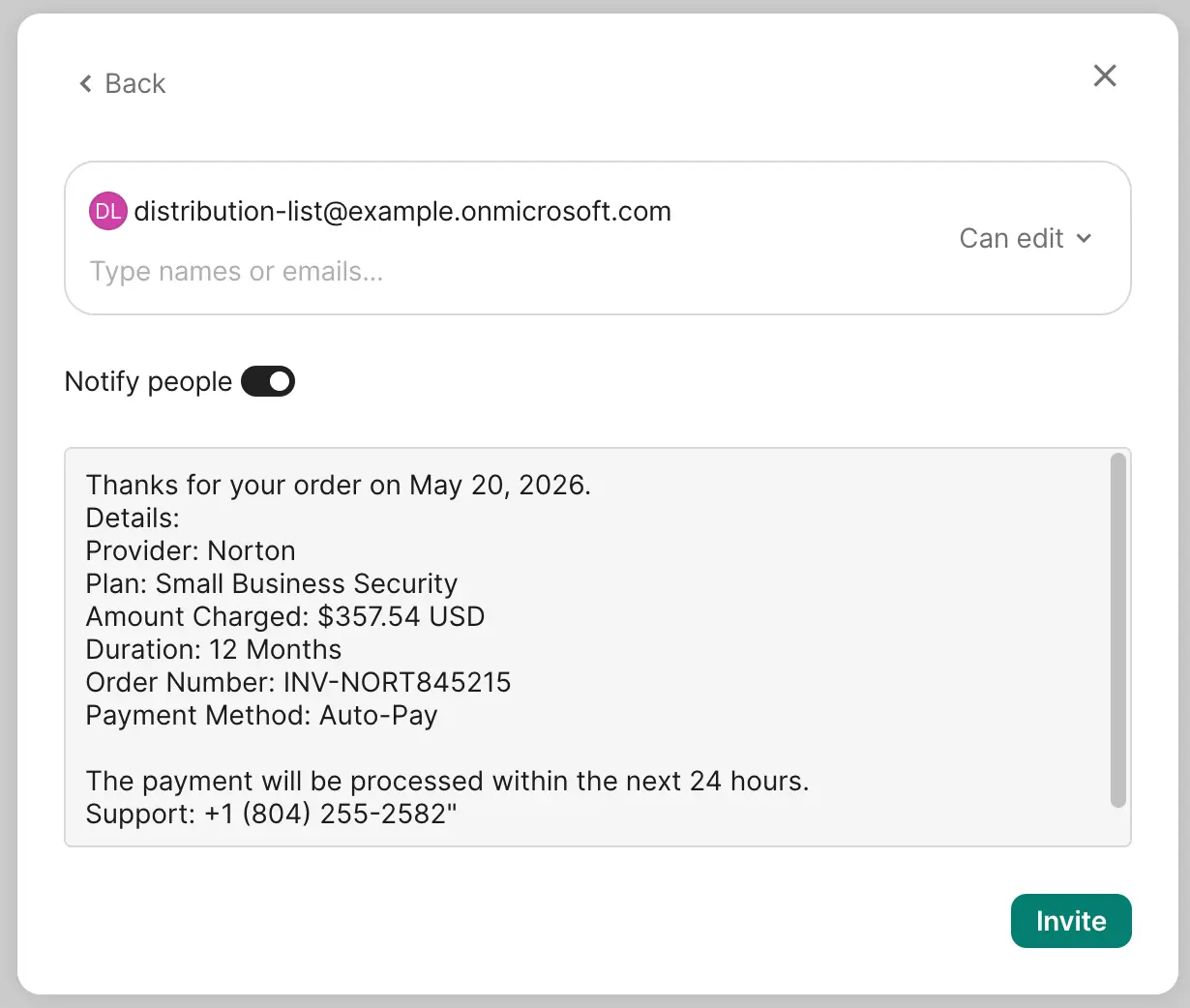
While Sublime will classify this message as callback phishing, applying input validation or security to this field could help decrease the amount of attacks being sent out in the first place.
Costco
Another way we see these attacks delivered is through actual purchase confirmations. In these scams, the attackers make a purchase (often with a stolen credit card), put the callback phishing information within the shipping address or purchase notes, and use the value of the purchase to scare targets into calling the phishing number to stop fraudulent charges. Here’s an example with a Costco order:
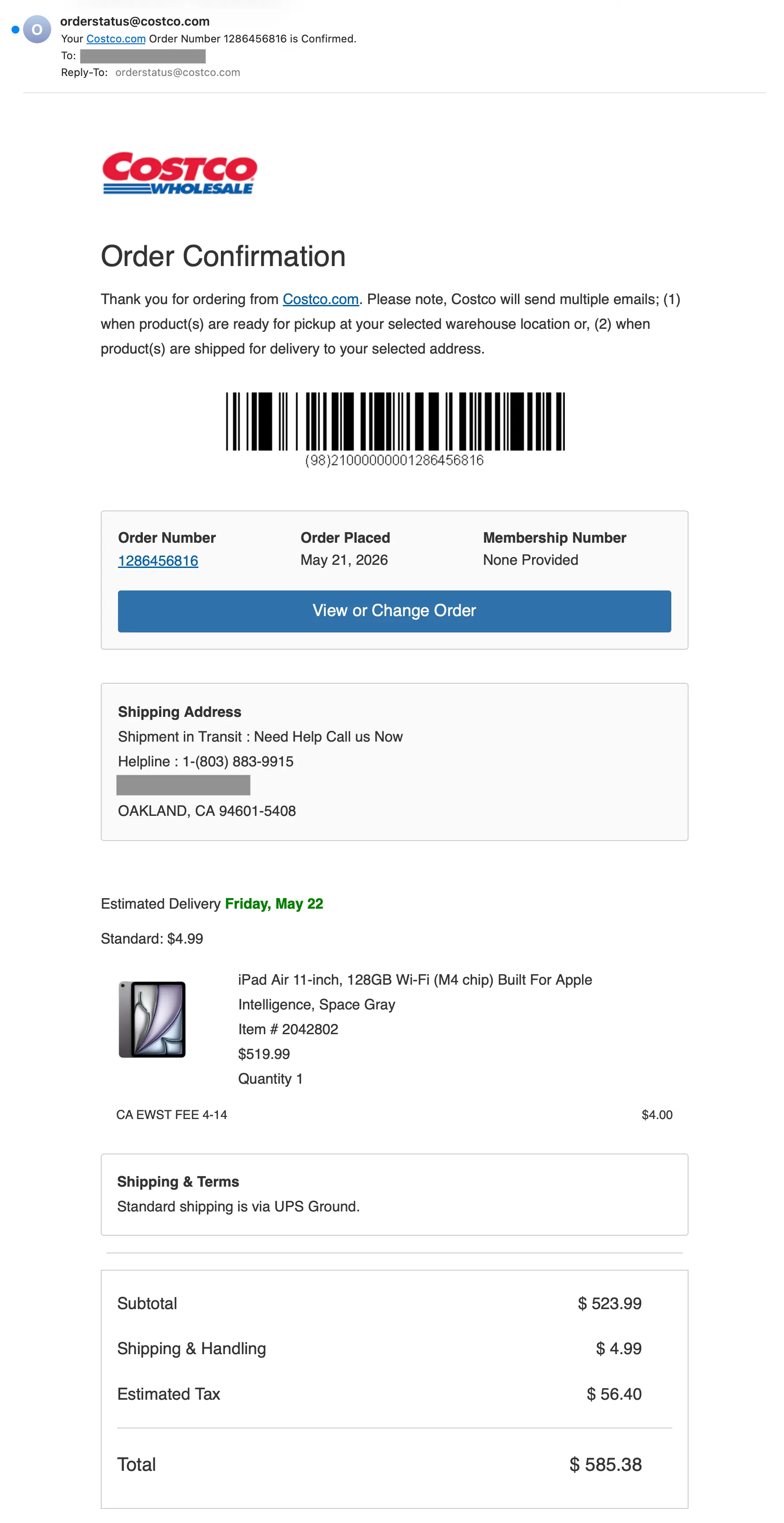
This is an actual confirmation from an actual order, but the receipt was sent to a distribution list and then forwarded to a variety of targets. While not every target would have a Costco account, those that do could be tricked into thinking their account was just used to make a $585 purchase. At that point, they would see the callback phishing number in the Shipping Address field and call the attacker to dispute the charge.
Detection signals
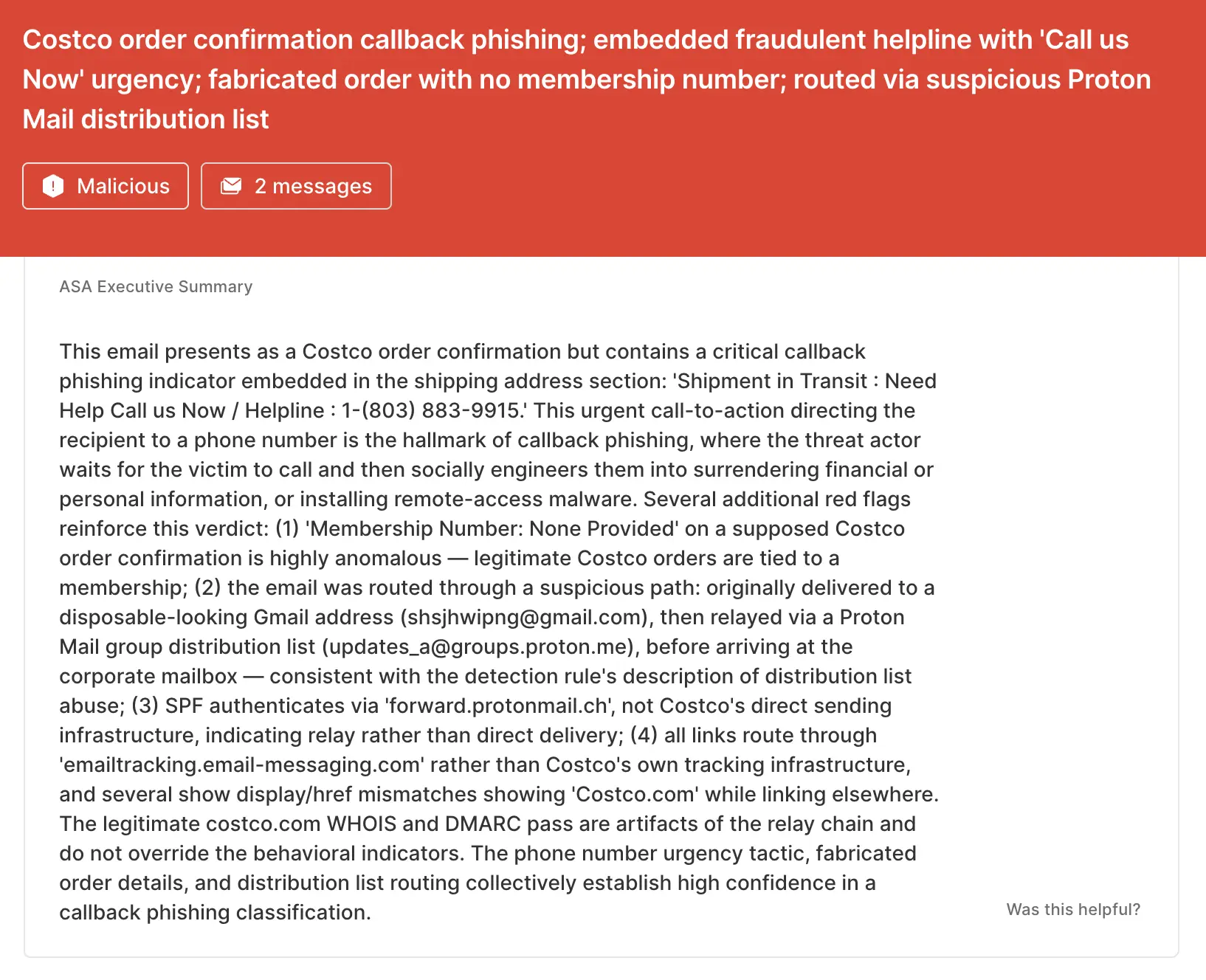
Sublime's AI-powered detection engine prevents these attacks. Some of the top signals from the Costco example were:
- Callback phishing in address: The Name and Company fields in the Shipping Address have the values of “Shipment in Transit : Need Help Call us Now” and “Helpline : 1-(803) 883-9915.”
- Blank membership number: If the target has a Costco membership number, it would be on the receipt. If the target is not a Costco member, they wouldn’t be receiving receipts.
- Distribution list: The message was first sent to a Gmail address, then to a Proton Mail group distribution list.
- Financial urgency: These are two of the most commonly used tactics for callback phishing attacks. The target is being sent a receipt and given a phone number to dispute the charges.
ASA, Sublime’s Autonomous Security Analyst, flagged this email as malicious. Here is ASA’s analysis summary:
No more notification scams
Attacks that use legitimate infrastructure as digital camouflage will always exist. That’s why the most effective email security platforms are adaptive, using AI and machine learning to shine a spotlight on the suspicious indicators of the scam.
If you enjoyed this Attack Spotlight, be sure to check our blog every week for new blogs, subscribe to our RSS feed, or sign up for our monthly newsletter. Our newsletter covers the latest blogs, detections, product updates, and more.
Read more Attack Spotlights:
Get the latest
Sublime releases, detections, blogs, events, and more directly to your inbox.
.svg)


.avif)
