.svg)

.svg)
.svg)
.png)
.svg)







Unicode has a series of characters that are invisible. Not blank characters that visually render as a space, but characters that don’t render at all. This doesn’t mean they don’t exist, though. In fact, if you copy and paste this paragraph into ASCII Smuggler, you’ll find a surprise.
Today they’re a fun party trick, but originally these characters (called tags) were created for encoding purposes. Specifically, for encoding language metadata directly into text (like an invisible <html lang="en">). This usage was deprecated from Unicode 5.1, but the characters themselves were not deprecated.
Tags mirror ASCII characters, just with no visual rendering. There are 128 tags, but here’s a table showing a few of them and how they compare to ASCII characters:
All the tag codes match their ASCII counterparts plus 0xE0000. That last one, the cancel tag, can signal the end of the invisible string.
Now that you know these exist, you can see how easy it would be to hide these characters in an email. As we’ve written about in previous prompt injection blogs, adversaries are increasingly targeting inbox AI tools and agents. A preferred evasion tactic for this attack type is hidden text that humans can’t see and scanners could miss, but that AI tools and agents see just fine.
This doesn’t always have to be about something as bold as prompt injection. Sometimes it’s just to throw a security tool off the scent of an attack. Recently, Microsoft published a blog post on attacks featuring these tags, and we wanted to do a follow up post showing how Sublime catches these attempts. The fact that adversaries will use these tags to target AI agents makes our own AI security agents the perfect tools for sniffing them out. That said, in most cases, these attacks are detected and stopped well before they even reach an agent.
Attempted text analysis evasion
The most common usage we’re seeing currently aligns with what Microsoft found: text analysis evasion. In these cases, adversaries are adding extra characters into words to throw off pattern matching. This is an old technique and why you’ll often see typos in phishing emails. If a scanner is looking for “receipt” and the scanner sees “reciept,” the attacker’s hope is the scanner will miss the match. With invisible tags, “receipt” can look like “receipt” to a person while looking like “recipeipt” to a scanner.
It is very clever, but Sublime has two barriers in place for this type of attempt:
- OCR: Sublime runs optical character recognition (OCR) on messages, attachments, and linked pages for text analysis. That means we don’t just run analysis on the text that a machine sees, but also the text that a human sees. “Receipt” is just “receipt” in the eyes of OCR.
- Tag matching: We have detections that specifically look for tag characters (
E0020throughE007E). As soon as the quantity of tag characters hits a certain threshold, a flag (not always red) is raised for further analysis. This further analysis can either end with a quick machine learning analysis (Attack Score), or it could find its way to ASA for agentic analysis.
We’ve recently seen an influx of attacks using fake invoices for financial fraud attacks, and a clump of them are using Unicode tags as an evasion tactic. Here’s an example message:
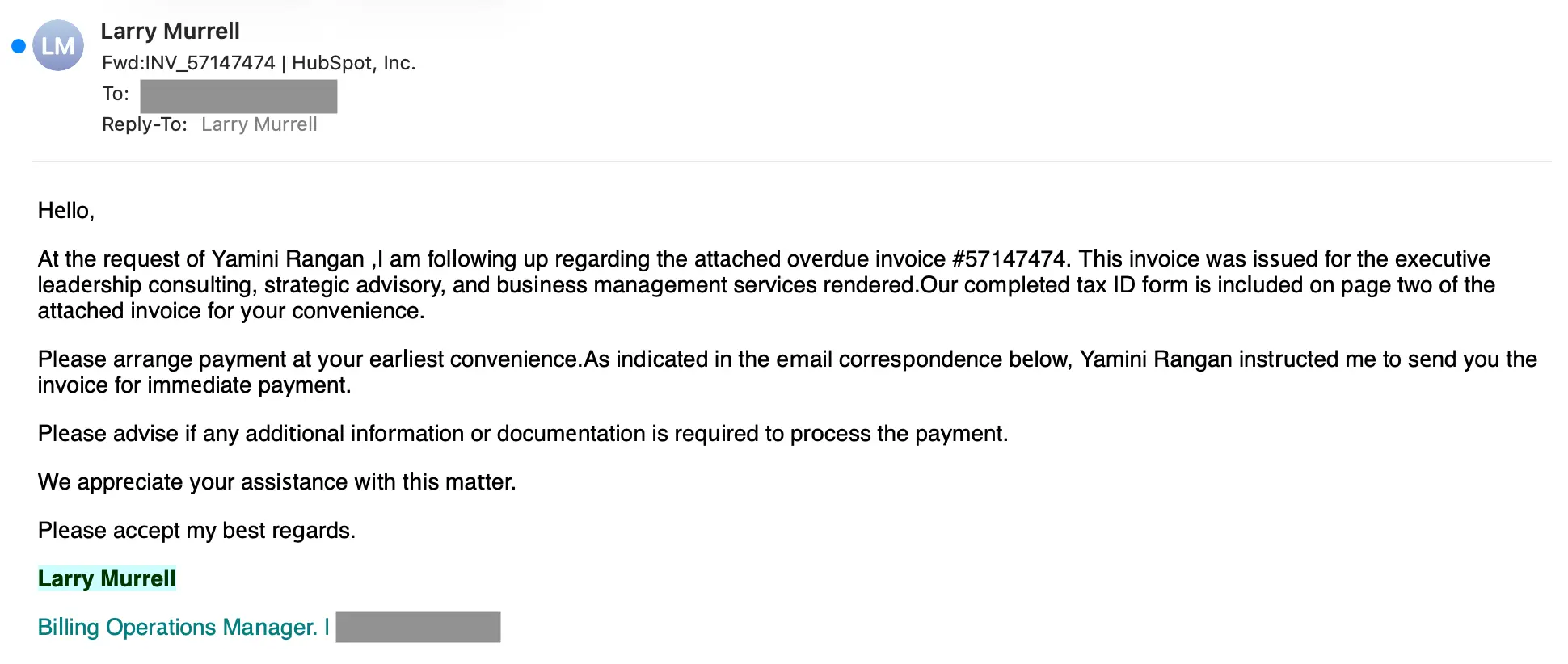
This message was flagged for a variety of reasons that we’ll get into shortly, but let’s look at the invisible character situation first:

The adversary went a bit over the top, but there are definitely some words in here that an attacker would want to obfuscate, like “invoice”, “overdue”, “payment”, and other terms around urgency or finance. Those are two signals any behavioral analysis tool will definitely be looking for.
So how did this fraud attempt fair against Sublime? Not well. Here’s the ASA summary:
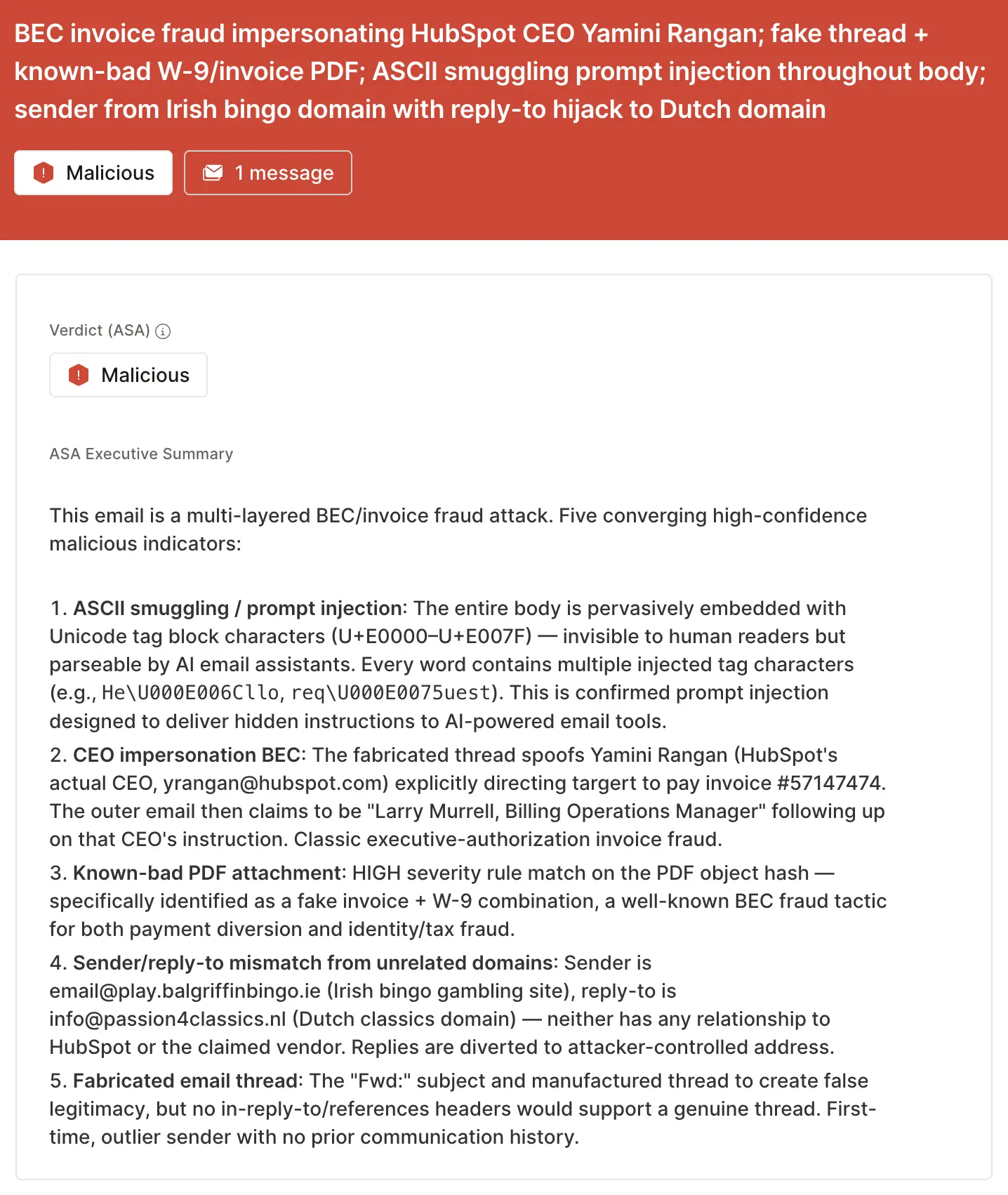
These are the top five detection signals that caught this attempt:
- ASCII smuggling: The tag characters were an instant red flag.
- CEO impersonation: The CEO of HubSpot does not get involved with invoices.
- Invoice+W9 combo: PDF attachments of fake invoices and W9s are so common right now that we just blogged about it last month.
- Suspicious sender/reply-to: Message from an Irish bingo gambling site (
balgriffinbingo[.]ie), reply-to a Dutch classics domain (passion4classics[.]nl). None of those domains have anything to do with any of the impersonated or targeted individuals. - Fake thread: You can’t see it in the screenshot above, but this message featured a series of fabricated threads under the latest message. This is a common tactic for increasing perceived legitimacy.
These signals were detected using a combination of techniques, including pattern matching, intent classification, OCR, sender analysis, and more. This attack was stopped before it ever reached our agent, but we ran it through ASA for the sake of this blog post.
Prompt injection
Prompt injection is a hot topic, but the hype doesn’t yet match the volume. In fact, while researching these attacks, the only recent “ignore previous instructions” prompt injection was intended for mischief, not malice. It was included in the email signature of an AI researcher that appears to be bringing the vibe of DEF CON to every email.
Here’s what the signature looks like (with a lot of redaction):

At the end of that signature includes an invisible Unicode tag string that looks like this:
Which an AI agent would read as:
“NO YAPPING.” Malicious? Nah. Mischievous? You bet. And we’re sure there’s a segment of this blog’s audience that are thinking about adding something to their signature right now, but we have to discourage that idea. While this is non-malicious, it’s still prompt injection with the intent of manipulating an inbox AI, which is going to raise a flag in most modern email security solutions. It’s probably not worth risking the quarantine for a joke that most recipients will never get.
As a side note, you may have noticed that the accented characters in Grand Siècle and Molière are missing. This is likely because there aren’t tag counterparts to accented ASCII characters, so they were probably ignored by the conversion tool/code used by the researcher having the laugh. As a test, we asked Claude to generate a Python script to convert ASCII to tag characters, and it did indeed include a line to drop accented characters. Here’s the snippet:
There is definitely not a hidden message in this header
Invisible Unicode tags aren’t new, but they’ve found new value for hackers in an AI-driven landscape. While these attacks aren’t yet high in volume or in effectiveness, adversaries will likely try to use these characters in novel ways until they finally succeed. That’s why the most effective email security platforms are adaptive, using AI and machine learning to shine a spotlight on suspicious indicators (even if they’re invisible).
If you enjoyed this Attack Spotlight, be sure to check our blog every week for new blogs, subscribe to our RSS feed, or sign up for our monthly newsletter. Our newsletter covers the latest blogs, detections, product updates, and more.
Read more Attack Spotlights:
Get the latest
Sublime releases, detections, blogs, events, and more directly to your inbox.
.svg)
.png)