

As the use of GenAI in malicious campaigns rapidly becomes the norm for small actors and campaigns, some of the signals of LLMs involvement are becoming clearer and clearer. The value of these signals and their efficacy for detecting AI generated attacks, though, has been debated. In fact, there are several blogs out already talking about this as an impossibility due to the sheer volume of both benign (e.g. marketers, salespeople, etc.) and malicious actors using GenAI.
For some detection engineers, our initial thought was to join the naysayers in arguing that the important thing is stopping attacks, not focusing on if the attack was generated by AI or written by a human. In fact, the original intent of this post was to show how hard it is to detect malicious emails just based off signals that LLMs created the content.
However, while doing research, it became clear that AI signals are awesome for hunting malicious email and can be used to reinforce detections. But there’s a catch: AI signals are ephemeral. Thanks to GenAI, adversaries can be constantly iterating and evolving their attacks.
This means that useful signals can iterate out of an attack in weeks or months. Moreover, many of the “quirks” of content generated by AI (em dashes, code comments, rounded edges) have completely unknown shelf lives. Still, a fleeting signal is still a signal, and some of these signals are too good not to use while we have them. Let’s look at the arguments and the signals.
Why you can’t use AI signals for attack detections
The internet is experiencing a firehose of AI slop right now, only made worse by the fact that everyone and their dog is suddenly a vibe-coder. It’s not just code: websites, products, services, blogs, books, TV, apps, and emails are being slopped out by the millions (and being sloppy-pasted directly from ChatGPT, Claude, Gemini, and all the GenAI startups that inject LLMs into every corner of the virtual and physical world). This means that the majority of GenAI content is not malicious.
On top of most GenAI content being benign, it’s also getting more human. Microsoft and several other security vendors have already released research disclosing why GenAI is not a good signal **for malicious content. Sadasivan et al. (ICLR 2024) provided the theoretical foundation for why this will only get worse. Their “impossibility framework” proves that as language models improve, the total variation distance between human and AI text distributions shrinks, mathematically bounding the best achievable detector performance. The implication is spooky:
"…reliable AI text detection may be fundamentally impossible as models converge toward human-like output."
In Microsoft’s September 24, 2025 blog post “AI vs. AI: Detecting an AI-Obfuscated Phishing Campaign,” Microsoft Threat Intelligence detailed a credential phishing campaign (detected August 18, 2025, targeting US organizations) that used an LLM to generate obfuscated SVG file payloads. Microsoft Security Copilot analyzed the malicious code and identified five specific categories of LLM artifacts.
- Overly descriptive variable/function names with pseudo-random hex suffixes (e.g.,
processBusinessMetricsf43e08,initializeAnalytics4e2250) described as “typical of AI/LLM-generated code.” - Over-engineered code structure with “clear separation of concerns and repeated use of similar logic blocks” and “characteristic of AI/LLM output, which tends to over-engineer and generalize solutions.” We see this in email all the time, like declarative
doc-typecomments in the HTML of the email. This is also found in a lot of templated-email platforms and advertising campaigns. - Unnecessary technical elements, like XML declarations and CDATA-wrapped scripts. We see this some in email too.
- Formulaic obfuscation patterns, like systematic, templated encoding that is “both thorough and formulaic, matching the style of AI/LLM code generation.”
- Verbose, generic, useless/self-explanatory comments. There will be plenty of examples of this in the below IOCs section. Microsoft called these “a hallmark of AI-generated documentation.” While this signal is definitely fleeting (attackers should be catching on by now), this is a gem for GenAI detection. While you can easily add “don’t include comments” in an LLM prompt, most bad actors are either unaware, lazy, or forgetful, and leave these signals in place
“AI-generated obfuscation often introduces synthetic artifacts, like verbose naming, redundant logic, or unnatural encoding schemes, that can become new detection signals themselves.”
The blog ends with the conclusion that the attack was detected using standard signals (self-addressed email with BCC, redirect, obfuscated code, etc.), which is accurate and lands them in the “AI signals are unimportant” camp. But that’s only half of the story. Yes, these signals are fleeting, and yes, the attack was stopped without them. But that said, a signal is a signal, so why not use it? Not as a detection in and of itself, but as a way to boost existing detections.
Why you can use AI signals for attack detections
To be clear, AI indicators are in no way load bearing signals. Detections need to be robust, though, so adding AI signals can help fill them out. That’s the argument right there. These signals are helpful, not home runs.
While Microsoft’s write-up focused on JavaScript within an SVG attachment, not HTML email bodies, the notion that LLMs leave characteristic structural fingerprints in generated code applies directly to HTML email templates as well.
Let’s take a look at some AI-generated messages. There are several things to pick apart in the following emails that we’ve seen in the wild. We’ll focus on the most egregious signals in each. Since half of the fun of these signals is hunting for them in your own environment, we’ve also included MQL at the end of the post so you can threat hunt GenAI emails in your org’s inboxes.
Useful: Comments
In this example, we see a classic cloud storage auto-payment scam email. The fact that Sublime caught it means that this message had already evaded the built-in security of one of the major cloud email providers.
As a quick aside, an argument could be made that signals could have the same lifespan as scam types. We all know the cloud storage scam, yet it still exists. It’s clearly still working.
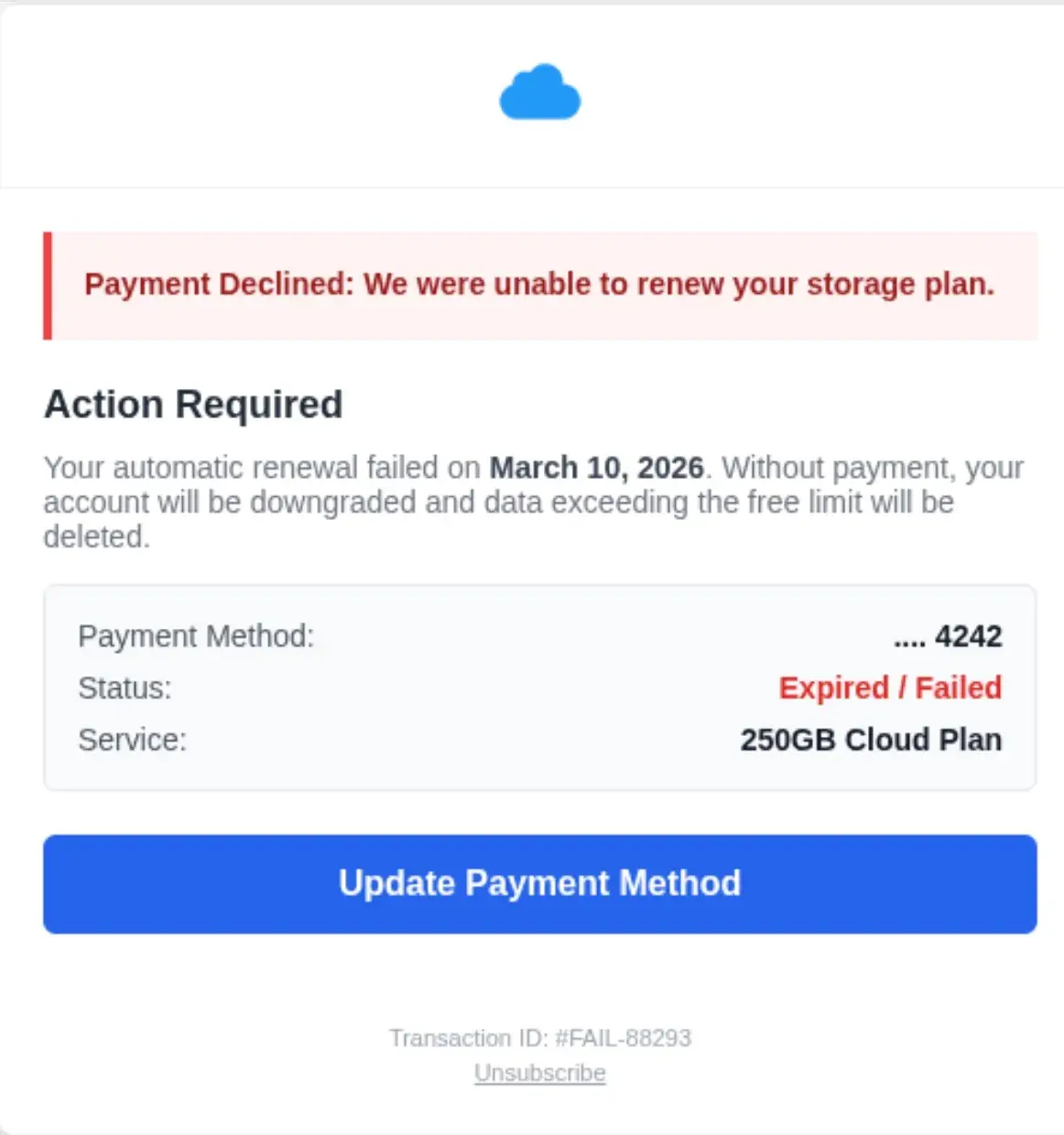
We can see that this is an AI-generated attack if we look in the HTML of the message:
Those are the actual comments in the email HTML. As requested falls into the category of “continued LLM conversation” that we see in attacks. This is good evidence of the iterative (and often frustrating) experience of prompting. The attacker clearly had a weak initial prompt and didn’t get exactly what they wanted, so they had to re-prompt. As most LLMs aim to be both pleasing and verbose, this one added helpful little code comments to help the attacker.
There are also dozens of examples of conversational-context clues within HTML. A very common one is keeping the exact same structure. This is indicative of iterative prompting.
Here’s another fun one where comments are giving away too much information to have been written by a human. Take a look at the suspicious attempt at a CVS logo in this gift card scam:
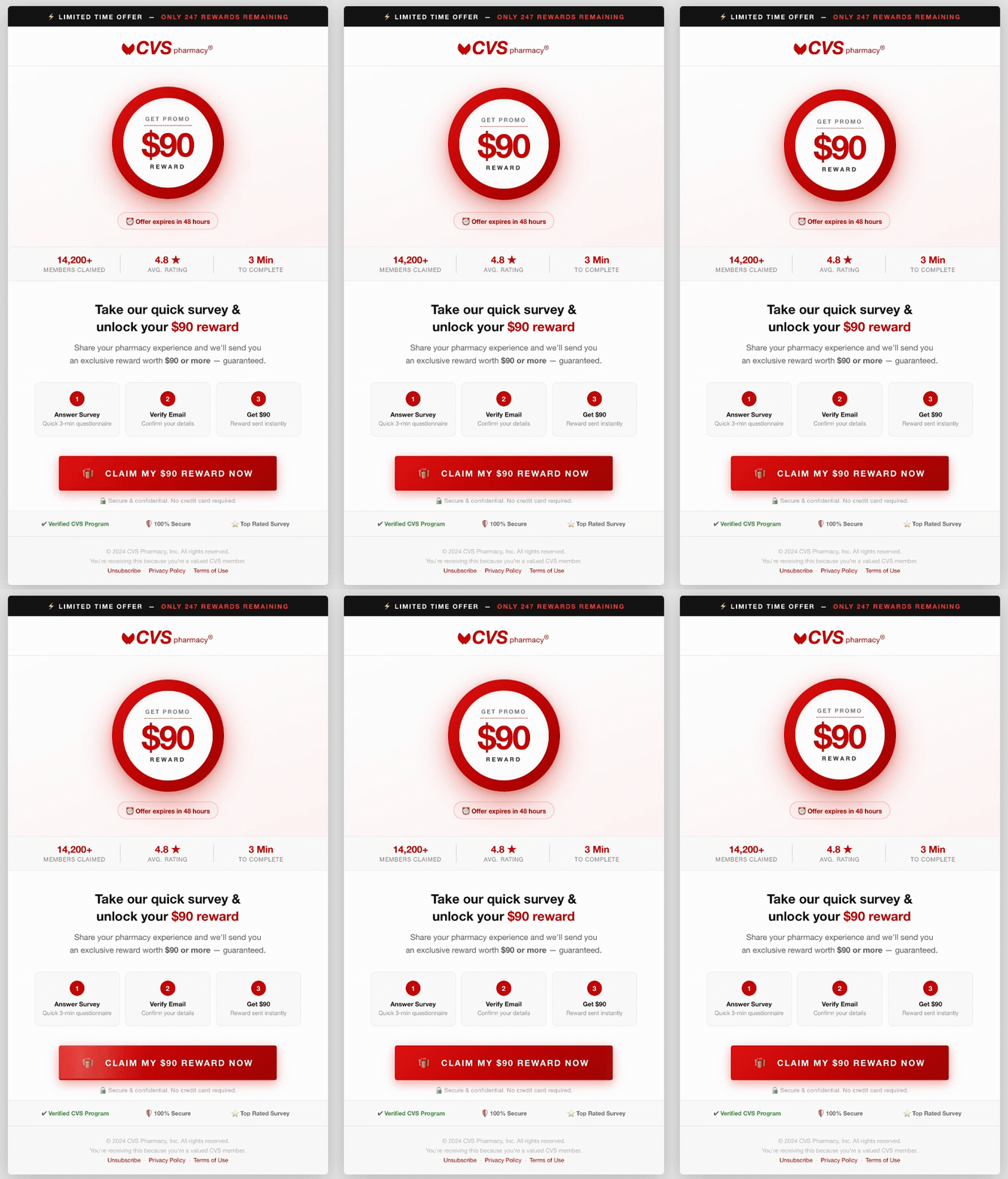
You’ll notice the CVS logo heart doesn’t look quite right. That’s because the attacker had their LLM generate the logo in HTML, which we can see right in the comment on line 4:
Folks that code with AI know that it loves to add comments. By adding these suspicious indicators into the mix, it only strengths the mounting case for this email being malicious.
Useful: Formatting
Aside from word indicators, AI also offers formatting indicators. Take a look at this message:
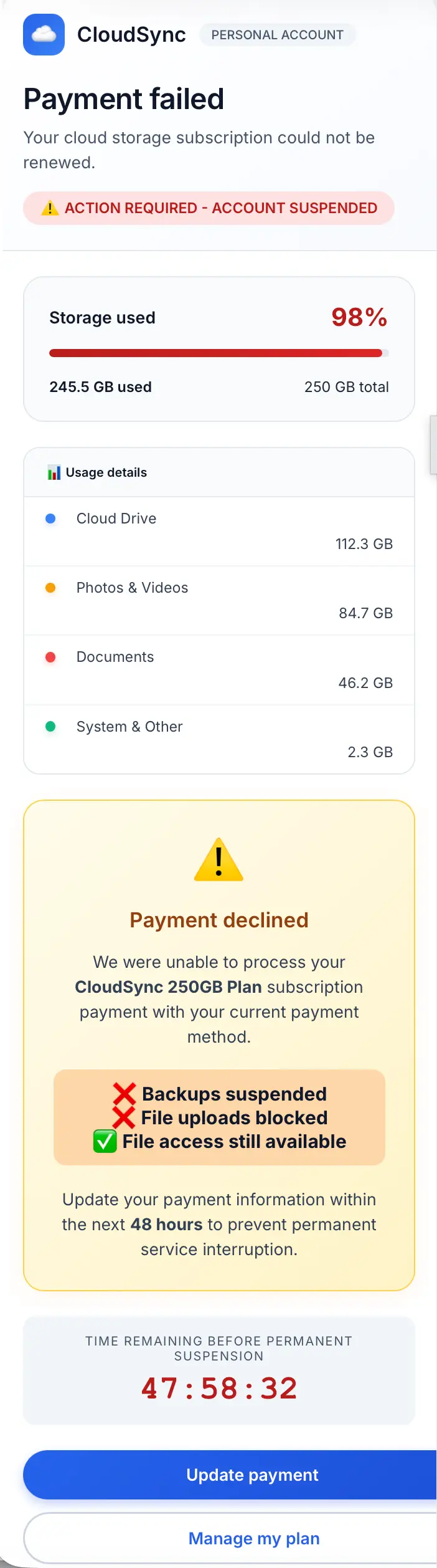
For starters, AI loves round corners. Text containers, buttons, callouts – AI won’t let any of them have a sharp corner.
Another thing we’ve noticed with AI is non-centered text within an HTML element. Look at the Usage details breakdown toward the top left. The usage in GB is off centered with its category. Additionally, certain LLM-generated sites and messages will have content spill out of HTML elements or be off-centered (see the Update payment and Manage my plan buttons). These are not great detection signals (plenty of templated email generators that are benign have these same exact tells), but are good enough to throw into a threat hunt.
Another formatting decision AI frequently makes is the use of bulleted lists. In the latest models, we’re also seeing the use of colorful icons as bullets (see above example). In the below example, you can see bullets (<ul> elements), a rounded message box, three rounded text boxes, and a rounded button:
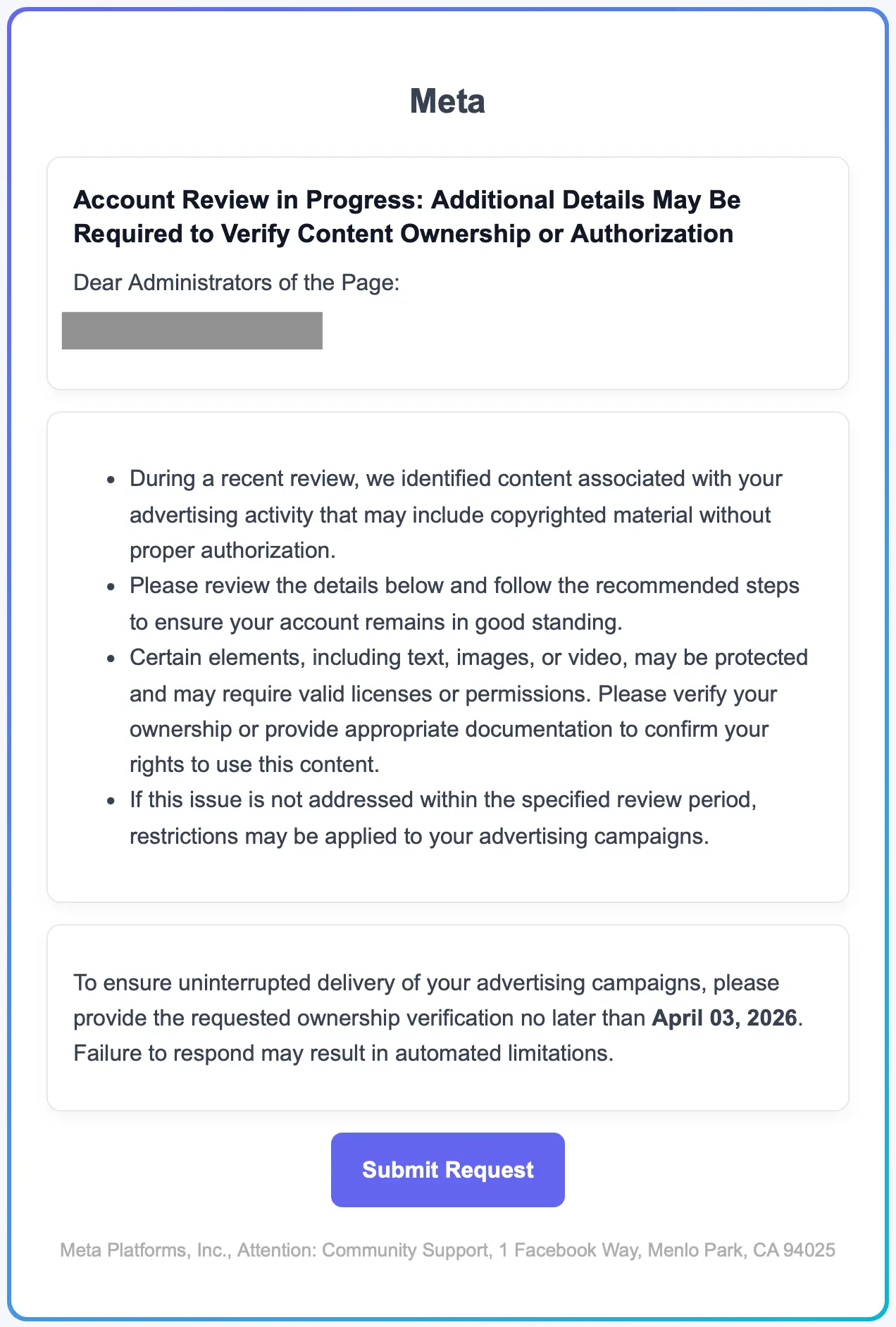
In this the HTML of this message, we also see color formatting that uses RGB color values rather than hex values. We see this a lot from AI, especially for text that didn't need a color override at all.
The last two signals are color-based. First, we’re seeing gradients making a comeback (note the header below). AI learned that from the websites of ten years ago. Next, notice the little blue color tab on the left side of the date callout box. These are another common formatting choice by AI.
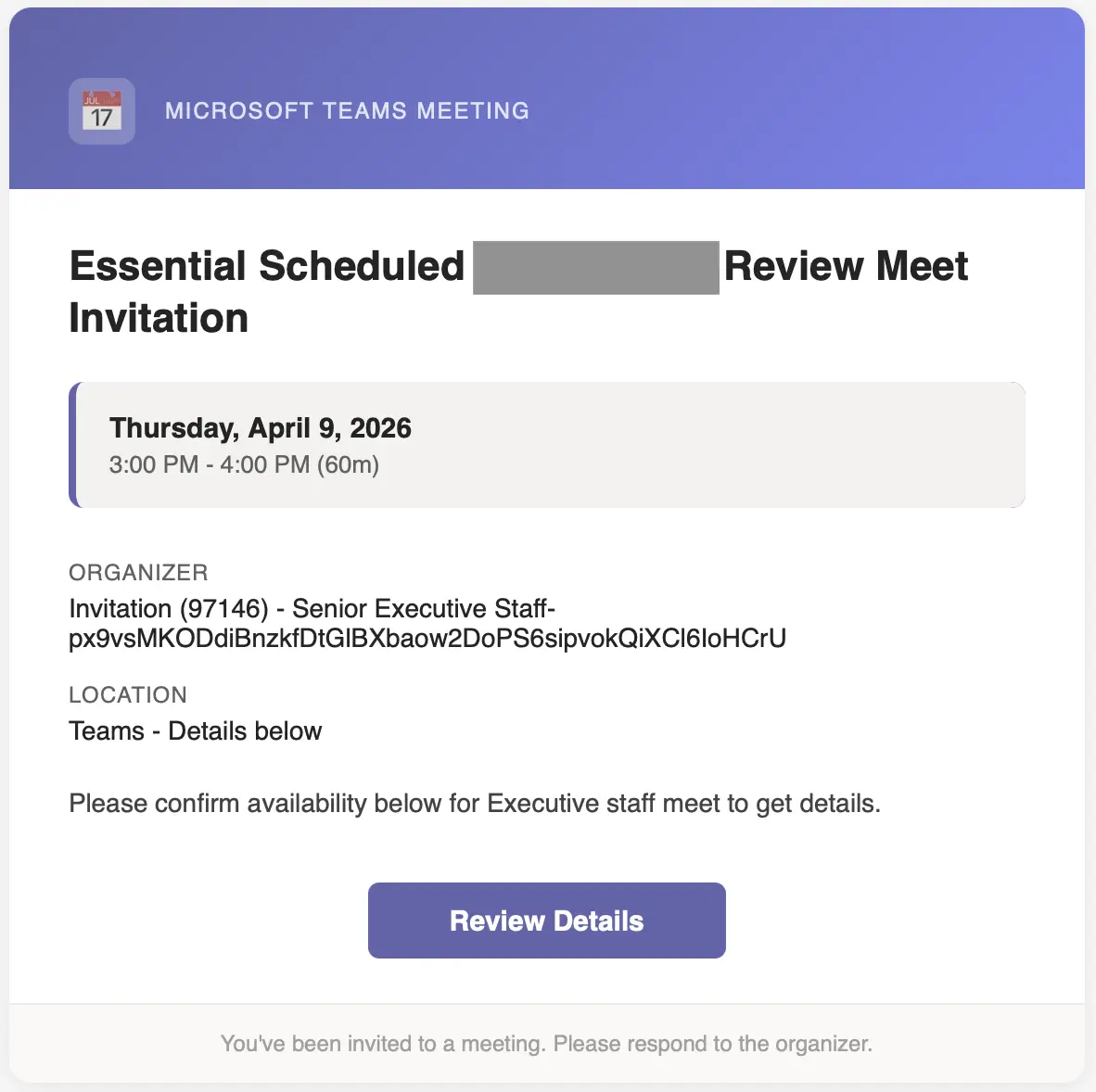
It will be interesting to watch AI shift its formatting decisions over time. One can only hope blinking text makes a comeback.
Less useful: Placeholders
AI templates also can feature the classic breadcrumbs of placeholder text: [Your Name], [Company Logo], href="#", src="<https://example.com/logo.png>". These placeholder values are great signals for AI, but this signal is also a frequent source of false positives. Our most recent April Fools’ post featured examples of these.
The problem with these placeholders is that they’re also present in so many legitimate template libraries, half-finished marketing drafts, and other benign emails that good-intentioned people used LLMs to make.
Another placeholder-adjacent indicator is the use of localhost. This could indicate that the LLM thought it was generating emails for a honeypot, pentesting, or research (which are within the bounds of allowed usage).
While these are not detection-worthy on their own, they can be worth including as a contributing signal in a broader rule or a hunt.
Useful: Yellow highlighting
While there are many more AI signals out there, we’re going to end with the fabled yellow highlight. Here’s what it looks like:
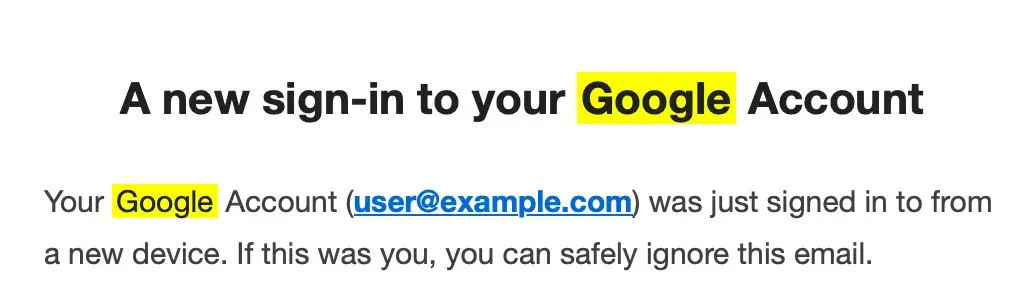
These highlights happen often enough to be useful. In fact, we’ve uncovered a good amount of malicious messages using this as a signal. But what are they? We’re fairly certain that these happen when:
- A bad actor searches their email for "Google" using the native Gmail search feature, which highlights search terms in yellow.
- They then take a screenshot of the email with “Google” still highlighted in the email.
- Next they feed the screenshot to an LLM and the LLM, thinking the yellow part of the request, outputs an attack template featuring the highlighting.
Here’s what the HTML looks like:
Threat hunting with AI signals
As promised, here is some MQL that could be used to hunt for AI threats within your org. Give it a try in your Sublime deployment. If you find the signals useful, you can add them to your existing Detection Rules in a few clicks.
Is detecting GenAI enough?
No. But some of these GenAI signals present threat hunting and detection opportunities.
Additionally, many signals will survive the attack iteration process long enough to identify new attack signals. As the attacks evolve, new signals will appear alongside sunsetting signals, and that overlap period gives us time to identify and transition to the new signals. This is one of the reasons why we built ADÉ, our Autonomous Detection Engineer, to keep pace with signal iteration by automatically generating new detection rules as attacks shift. So if you’re thinking that security needs to be constantly evolving to keep up with the latest attack iterations, you’re absolutely right!
Get a demo of Sublime to see how we keep up with AI-powered attacks.
Get the latest
Sublime releases, detections, blogs, events, and more directly to your inbox.
.svg)
.avif)
