





A service outage gives attackers a ready-made explanation for missing email. On November 13, 2026, the day after a Microsoft 365 disruption, fake service health notices told recipients their messages had been held during the outage and would be deleted within 24 hours unless they clicked “RESTORE MESSAGES.”
It’s a familiar held-mail lure with a timely pretext. Instead of asking the recipient to believe that something has gone wrong, the attacker borrows a disruption the recipient likely already knows about. The fake notice presents clicking a link as the final step in getting back to normal.
Sublime saw this campaign in multiple customer environments that day, and five of our detections fired against it. Microsoft Threat Intelligence published its own analysis of the lure and infrastructure. Below, we walk through the campaign and why a detection written in 2023 flagged it.
The lure
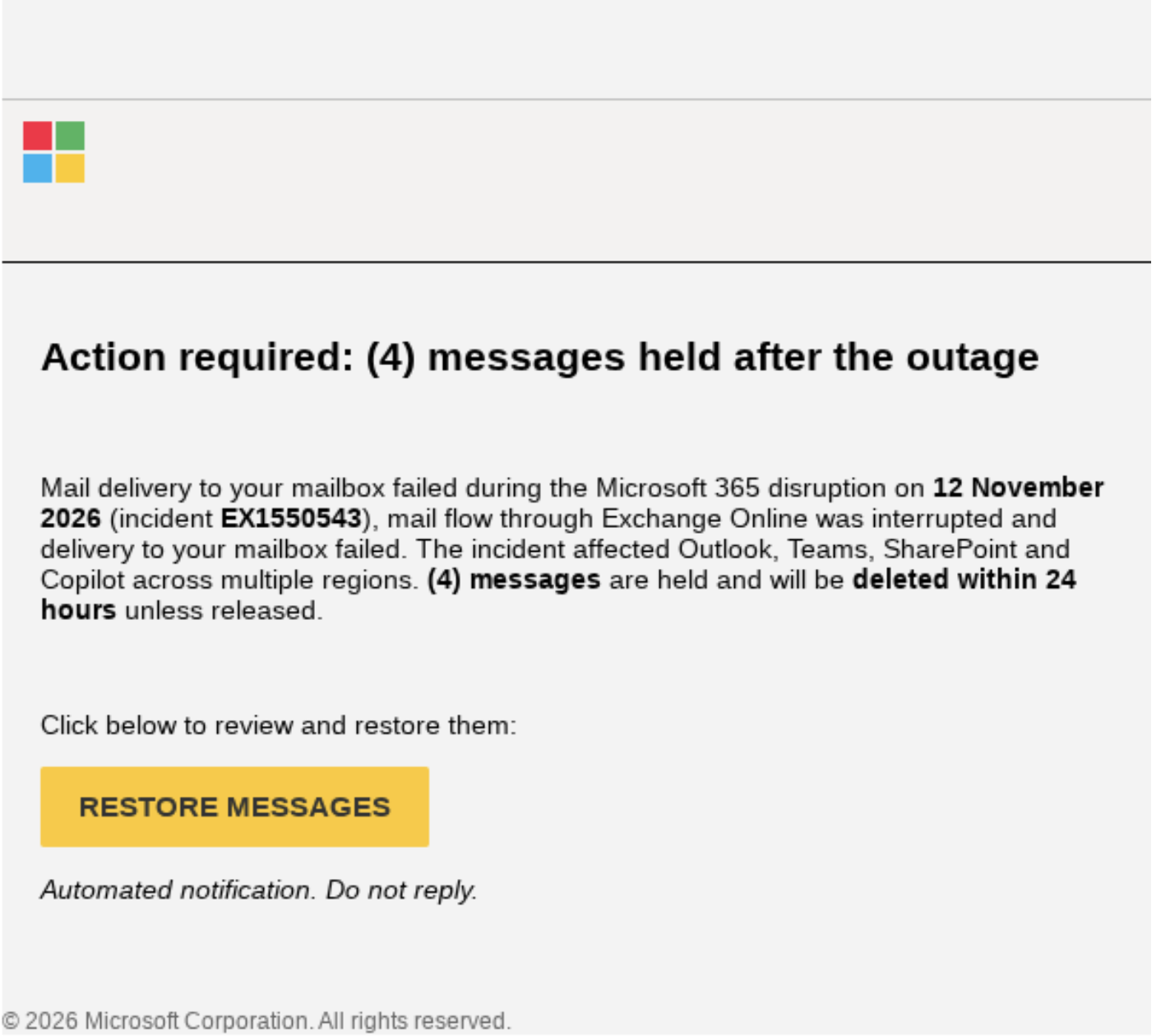
Sublime observed messages in this campaign that combined the appearance of a service notification with a threat of lost mail:
- Subject: “Outage –” followed by a randomized string, such as “Outage – aF7vG6.”
- Sender display name: An organization-style prefix followed by “Outage Notification” or “Service Health,” such as “MSF Outage Notification.”
- Body: Referenced the previous day’s Exchange Online incident and claimed that messages had been held. Threatening that the recipient supposedly had 24 hours to recover them before deletion created a sense of urgency.
- Call to action: A prominent “RESTORE MESSAGES” or “TAKE ACTION” link.
The deadline and threat of permanently lost email is designed to coerce the recipient into taking quick action without thinking or taking time to check where the link goes.
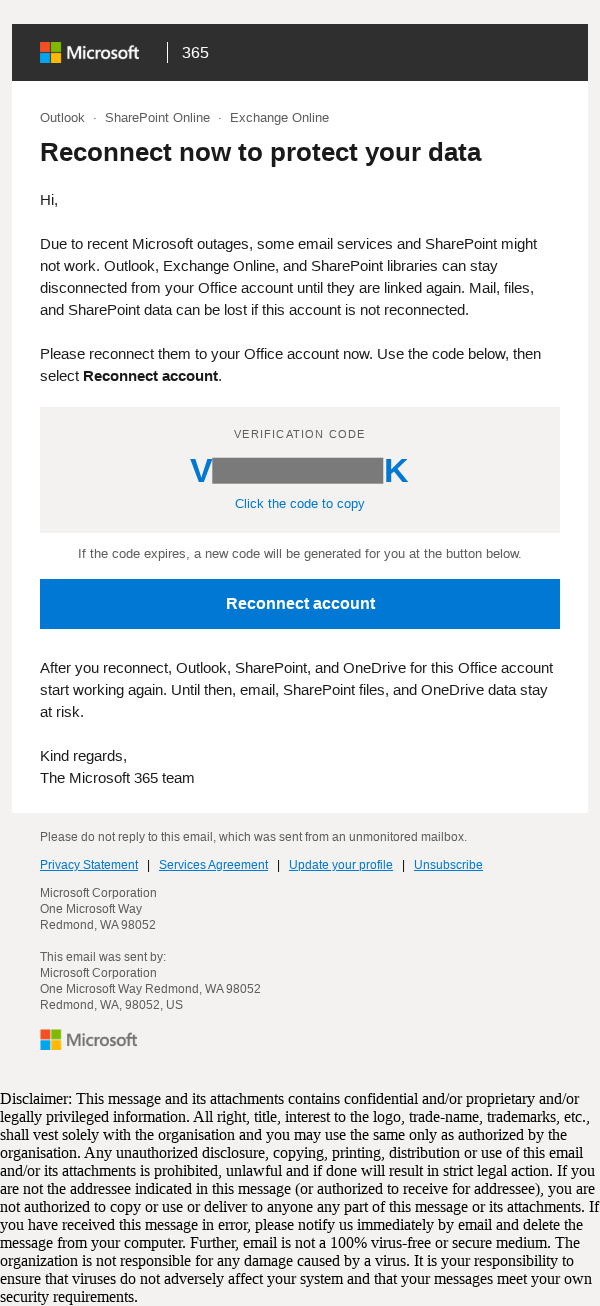
Another lure also referenced the Microsoft outage and threatened that mail, documents and other data could be lost if the recipient did not take quick action. This lure used device code phishing, which can appear safe and legitimate because the URL that the "Reconnect Account" goes to is an official Microsoft site. It just happens to be the page that allows you to authenticate your Microsoft account on a remote device, and in this case, that device belongs to the attacker who generated the code and sent the email.
In all the variations of this lure, the attacker used a fake threat of data destruction and a deadline to lure recipients into taking quick action.
Tracking links and hidden text
Several details make the campaign hard to match on any single indicator:
- Sender domains that varied across messages, including
moments-notice[.]com,planetmaison[.]com, andnewbooker[.]com. - Sublime also detected emails using device code phishing, with links that went to legitimate Microsoft infrastructure.
- The "recovery links" used individualized click-tracking URLs through SendGrid, a legitimate email delivery platform. Several link chains led to
reallifeaccounting[.]com, including its/themelist0[.]htmlpage. Microsoft also listedoutagefixed[.]sbsandoutagerestored[.]sbsamong downstream destinations. - Sublime also observed Google URL shortener "c[.]gle" used to obfuscate link destinations.
- Sublime observed in the "Messages Held" lure that there was a fake email conversation in the message body, out of the recipient’s view, apparently to evade mail filtering. The fake email text wasn't invisible, it just required scrolling down past some blank space. The email text was completely random, having nothing to do with the Microsoft outage.
Sublime assesses with high confidence that the goal of the observed campaigns was credential phishing. This is not surprising, since that is by far the most common goal of malicious campaigns. Threat actors can make many uses of stolen credentials, and device code phishing bypasses the protections of Multi-Factor Authentication to give an attacker access to an account without even needing to steal the password.
Randomized subjects and per-recipient links defeat exact-match blocking, and blocking the delivery service outright isn’t an option because legitimate mail runs through it too. What stays constant is the pattern: a sender claiming to be Microsoft, a demand to recover mail, and a destination that has nothing to do with Microsoft or that is a Microsoft page that is for device code authentication, having nothing to do with recovering email.
Why a 2023 detection caught an outage lure
Sublime’s Microsoft brand impersonation detection that fired against this campaign was created in November 2023, almost three years before the outage, so it never needed an outage-specific signature. Its logic combines three checks:
- Logo detection examines a rendered screenshot of the message for Microsoft branding.
- Natural language understanding checks the message text for credential-theft intent, with an OCR fallback when there is no readable text.
- Sender checks weigh history and authentication, with exclusions for recognized legitimate Microsoft mail.
None of those checks depend on the “Outage –” subject or the campaign’s domains. The pretext was a day old, and the detection didn’t need to know about it.
Detection signals
Some of the top signals from the featured example were:
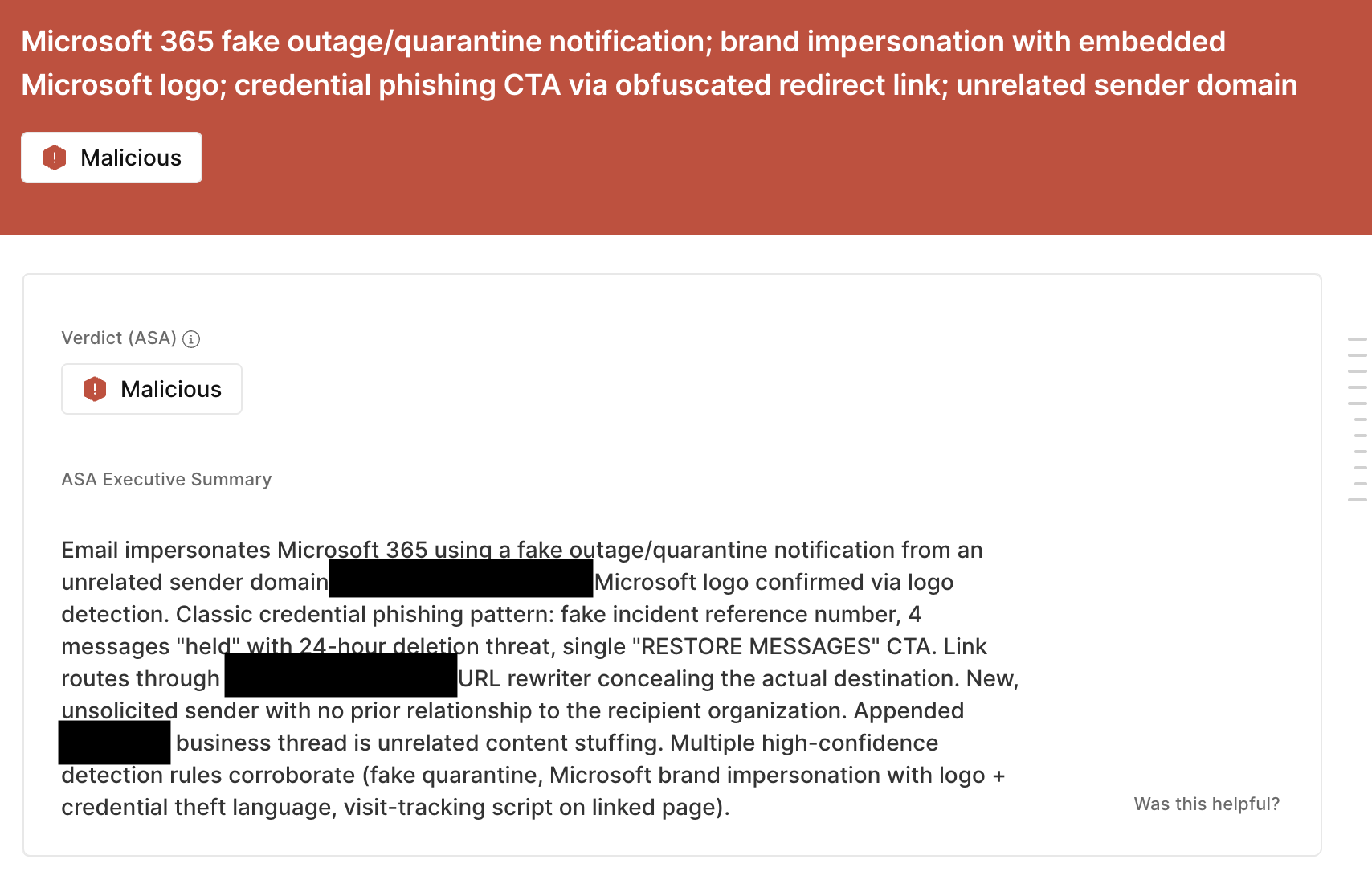
- Fake outage notice with a deletion deadline: The message cites an incident reference number, claims four messages are being held, and threatens deletion within 24 hours unless the recipient clicks RESTORE MESSAGES.
- Microsoft logo from an unrelated sender: Logo detection confirmed Microsoft branding, but the message came from
moments-notice[.]com, which has no connection to Microsoft. - Concealed link destination: The RESTORE MESSAGES link routes through a URL rewriter that hides where it actually leads, and the linked page carries a visit-tracking script.
- First-time sender: The sender had no prior relationship with the recipient organization.
- Unrelated appended thread: A business email thread with no connection to the lure was appended to the message, padding it with unrelated content.
ASA, Sublime’s Autonomous Security Analyst, flagged these emails as malicious. Here is ASA’s analysis summary:
Outages make easy pretexts
The outage gave attackers the cover story, and the recovery link supplied the action. The next major outage will likely bring the same lure with a new headline. A lure that imitates Microsoft and sends the reader somewhere else leaves signals in the sender, the logo, and the destination, and credential phishing detections built on those signals don’t depend on which outage is in the news.
For defenders, a few checks matter:
- Verify service incidents through the Microsoft 365 admin center, not an unsolicited recovery link.
- Inspect the destination behind the button, including redirects. A Microsoft service health notice has no reason to send anyone to an unrelated domain to recover held mail.
- Check proxy, DNS, or sign-in logs for visits to the destination domains Microsoft listed. If credentials may have been entered, reset them and revoke active sessions.
- Perform a hunt on the known IOCs Microsoft reported, including sender domains and subjects:
If you enjoyed this Attack Spotlight, be sure to check our blog every week for new blogs, subscribe to our RSS feed, or sign up for our monthly newsletter. Our newsletter covers the latest blogs, detections, product updates, and more.
More Attack Spotlights:
Get the latest
Sublime releases, detections, blogs, events, and more directly to your inbox.