.svg)

.svg)
.svg)
.png)
.svg)





.avif)

AI AGENT | ASA
Autonomous Security Analyst
ASA (Autonomous Security Analyst) triages every user report and every gray-area message Sublime flags for review. It delivers a verdict with the reasoning behind it, then takes the action you've configured.
.png)
The review queue keeps growing while threats wait
Teams see hundreds of user reports and gray-area messages flagged for review each day, and most are benign. Each one still pulls analyst time, while real threats wait in the queue.
Reports sit, threats spread
Malicious messages sit in the queue for hours while reports pile up. End users keep clicking or forwarding the real threat in the meantime.
Most reports are benign
The majority of user reports are missed spam, graymail, or messages people just don't recognize. That volume crowds out the real threats.
Verdicts vary by analyst
Different analysts often reach different verdicts on similar messages, creating coverage gaps and outcomes that are hard to defend later.
Black-box automation you can't audit
Existing triage tools deliver a verdict, not the reasoning, so your team can't verify what was caught or defend the call later.
From report or flag to remediation in minutes
Same tools your analysts use, run automatically on every report and flag.
Every verdict comes with the evidence behind it
ASA shows the reasoning behind each verdict. You choose what happens next, and ASA learns from the corrections your team makes.
Verdicts you can audit
From human-readable summaries to full reports, down to the signals and tool outputs that drove the decision.
.svg)

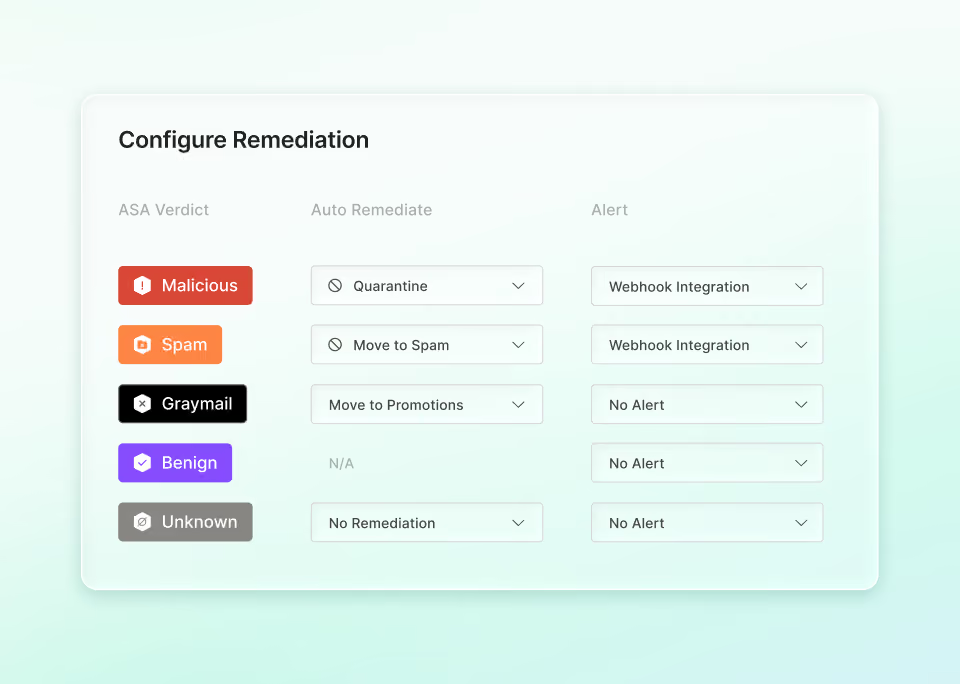
Actions per verdict
Per verdict, ASA quarantines, moves to spam or trash, adds a warning banner, or auto-closes the report. Alerts flow through Slack, webhook, or email.
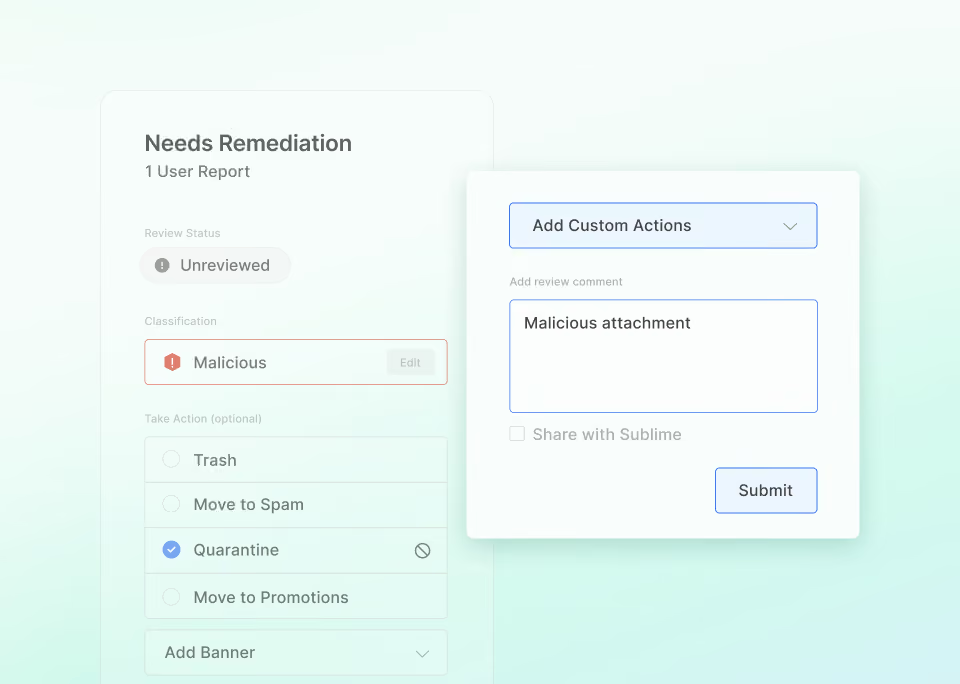
No vendor tickets
When a verdict is off, your team corrects it directly. ASA pulls in prior classifications and sender history, so future verdicts on that sender reflect how your team triages.
Passive first, active when ready
ASA is opt-in and inactive by default. Run in passive mode for analysis-only alerts, or active mode for full triage and remediation.
%201.avif)
Ready to see Sublime in action?
.svg)
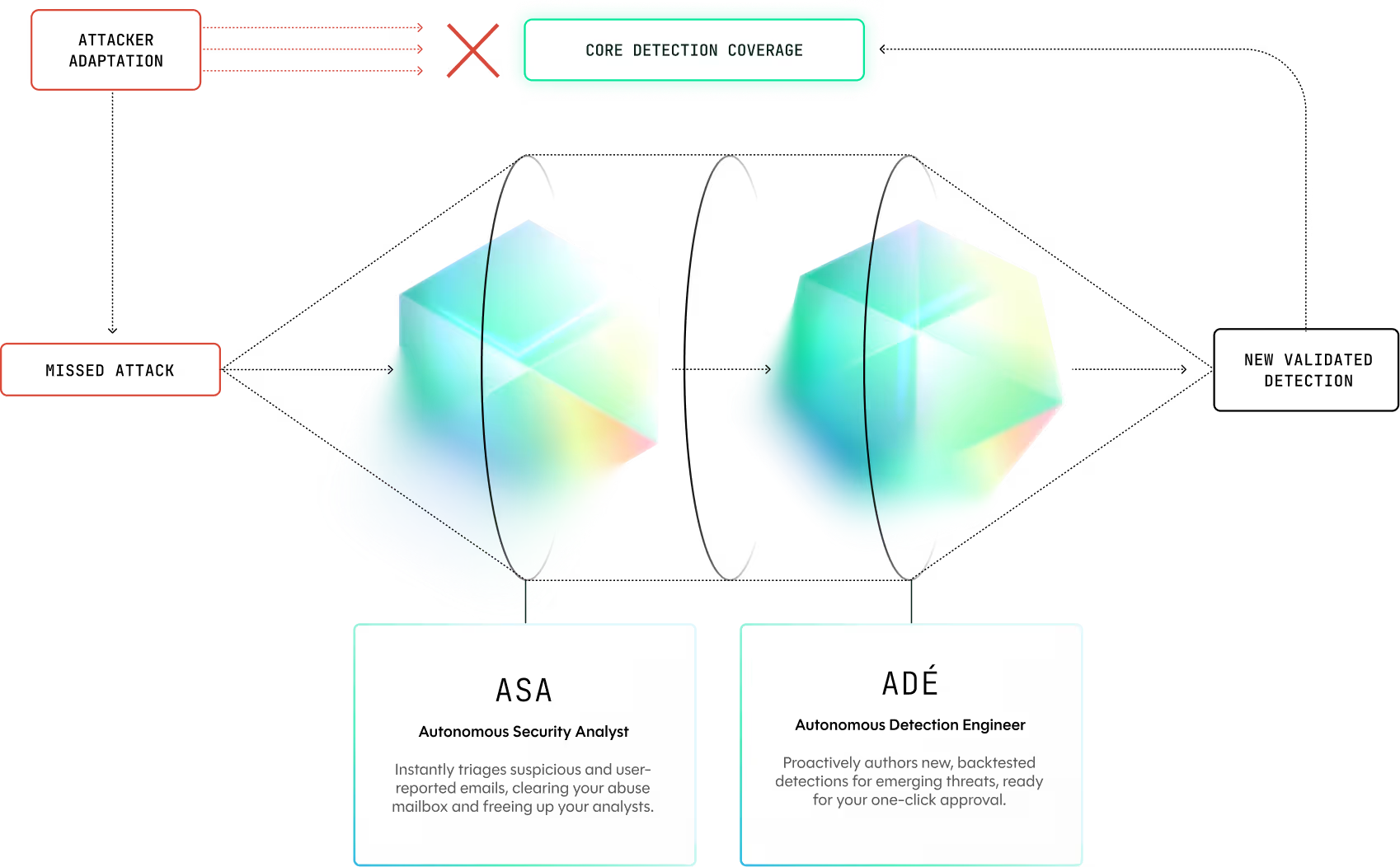
How ADÉ and ASA work together
Sublime's agents automate critical workflows to make your entire defense more responsive and effective.
What our customers are saying
.svg)

The black box approach to email security no longer works.
It reduces visibility on how
Brex may be attacked and
the tactics and techniques
used by attackers.
With Sublime, we now have transparency and the confidence to keep up with emerging threats.

Mark Hillick
CISO, Brex

The ability to automate remediations with high confidence and minimize manual reviews unlocks a new level of efficiency in our SOC. It’s hard to imagine going back to life before Sublime.

JJ Agha
CISO, Fanduel

What I love about the platform is that it just works. I’m so tired of all these tools I have to futz with, and Sublime is just easy.

Jason Kikta
CISO, Automox

With Sublime, we no longer wait weeks for vendor updates. Our team reacts instantly - which is critical for our fast-moving environment.
Frequently asked questions
What is ASA, and what does it do?
ASA is an AI agent that triages user reports and the gray-area messages Sublime flags for review, end-to-end. It assigns a verdict, writes a human-readable report, takes the action you've configured per verdict, and replies to the reporter on your behalf.
What kinds of emails does ASA run on?
User-reported messages and emails that Sublime initially flags as suspicious or unknown. Together, that's the 99.7% of triage volume ASA handles without analyst review.
Can we run ASA with a human in the loop?
Yes. ASA is opt-in and inactive by default. You choose passive mode (analysis only, with alerts) or active mode (full triage and remediation), and you control which verdicts trigger automated actions versus alerts only.
What actions can ASA take automatically?
You configure ASA's response per verdict. Options include quarantine, move to spam or trash, warning banner, auto-close, or alert via Slack, webhook, or email. Verdicts route to different actions, and any verdict can be set to alert-only.
How does ASA avoid hallucinating or inventing verdicts?
ASA grounds every decision in tool output and a Sublime-curated knowledge base, with citations on each verdict. When ASA's confidence is low, it returns an unknown verdict and escalates to a human analyst. No automated action is taken.
How long does ASA take to analyze a message?
Median analysis time is about one minute. Most finish in under a minute; complex investigations may take a few minutes.
Does using ASA share our data with third-party model providers?
No. Customer email data stays in your Sublime instance, no data is shared with third-party model providers, and no customer data is used to train the LLM. The request payload is purged immediately after the model returns its inference.
How do we deploy ASA, and is it on by default?
ASA is included in Sublime Enterprise (including standalone Triage), strictly opt-in and inactive by default. Run it in Sublime Cloud or self-host in your own AWS account, so customer email data stays in the region and tenancy your team requires.
Now is the time
See how Sublime delivers autonomous protection by default, with control on demand.