

Key Takeaways
- Choose transparency over guesswork. You should be able to see why a message was flagged, what signals drove the verdict, and what to tune when false positives or misses happen.
- Prioritize environment-specific protection. The best alternatives adapt to your users, vendors, and workflows, rather than forcing you into one-size-fits-all, vendor-defined models.
- Look for automation that closes the loop. Triage and remediation matter, but so does the ability to turn a “miss” into improved coverage quickly so the same attack does not repeat.
- Evaluate for day-to-day operations, not feature checklists. Integrations, investigation depth, and reporting should reduce analyst workload and increase confidence.
- If you want explainability and control, start with Sublime. Sublime is purpose-built for teams that need transparent detections, flexible rule logic, and rapid adaptation without ticket loops.
Email security is changing faster than legacy one-size-fits-all tools can keep up
Email is still the most common entry point for phishing, business email compromise (BEC) and malware. But what has changed is how quickly attackers can iterate:
- Automation at scale means a single campaign can test variations across thousands of targets in minutes.
- Identity-based targeting turns “generic phishing” into high-conviction social engineering tailored to execs, finance, vendors, and high-risk teams.
- AI-generated content makes messages easier to personalize and faster to adapt and overcome defenses.
As these threats evolve, more organizations are reevaluating their email security stack and looking for alternatives to Abnormal Security.
That reevaluation is not just about “who blocks more phishing.” It is about whether the security team can:
- Understand why something was allowed or blocked.
- Adapt quickly when a new attack pattern shows up.
- Prove outcomes to leadership with credible investigation context and reporting.
This guide covers leading Abnormal alternatives, but more importantly, it explains how to evaluate email security platforms in a way that reflects the reality of modern attacks and modern SOC workflows.
What to look for in an Abnormal Security alternative
The fastest path to a bad decision is evaluating tools as a simple feature checklist. Instead, compare vendors on whether they help your team operate effectively day to day.
Below are key criteria to use in an evaluation. Each section explains why it matters, what can go wrong, and how to assess it during a proof of value (POV).
1. Transparent, explainable detections
Security teams need to know why a message was allowed or blocked. When detection logic is opaque, the team cannot build confidence, justify decisions to stakeholders, or improve coverage.
What can go wrong:
- Slow remediation when something gets through. If you cannot see the logic behind a miss, you end up filing a ticket and waiting for vendor changes.
- Noisy alerts that are hard to tune. When false positives spike, you may be forced into broad allowlisting or turning off protections.
- Investigation dead-ends. A “because AI said so” explanation does not help an analyst understand what to hunt for next or how to prevent repeats.
What to validate:
- Can you see the exact signals and logic behind a detection (not just an after-the-fact summary)?
- Can an analyst answer: What evidence drove this verdict, and what would need to be different for the verdict to change?
Can you create or adjust detections for your environment (specific vendors, workflows, execs, regions) without waiting on the vendor?
2. Environment-specific or adaptive models
Email security is not a generic problem. Your risk is shaped by your users, your vendor ecosystem, your business workflows, and your normal communication patterns. A model built for the “average company” will always miss what is unique about yours.
What can go wrong:
- Targeted threats slip through because they look “normal” globally but are abnormal for your organization (vendor impersonation, invoice fraud, exec impersonation).
- False positives increase because legitimate business workflows look suspicious out of context.
- The same blind spots repeat across customers when the vendor’s centralized detection approach misses a pattern.
What to validate:
- Does the platform adapt its detections to your environment, or are you primarily limited to vendor-defined presets?
- Can you quickly protect high-risk workflows (payroll, AP, vendor changes, MFA reset requests) with precise logic?
- When there is a miss, can the team close the gap in minutes or hours, or is it days and weeks of ticket loops?
3. Automation that reduces manual workload
Most teams do not lose to “lack of detection.” They lose to time and capacity. If every suspicious email becomes a manual investigation, response times slip, burnout rises, and risky mail stays in inboxes.
What can go wrong:
- User-reported email becomes a queue, not a control. Analysts spend time triaging obvious spam instead of investigating real attacks.
- Inconsistent response. Two analysts handle the same report differently, which makes outcomes unpredictable.
- No feedback loop. Misses repeat because each incident is handled as a one-off, not as a detection improvement opportunity.
What to validate:
- How quickly can the platform triage a user-reported email and provide a verdict with evidence?
- Can it auto-remediate across all mailboxes when a message is confirmed malicious?
- When a miss occurs, can the platform help the team close the gap and hunt retroactively for similar messages?
- Can you tune automation so it reduces workload without hiding what happened?
4. Integration into existing security tools
Email is never the only data source in an incident. To investigate and respond quickly, teams need email security to fit into existing workflows across SIEM, SOAR, IAM, endpoint, and ticketing.
What can go wrong:
- Context stays siloed. Analysts bounce between tools and lose time reconstructing what happened.
- Manual handoffs. Triage results are copied into tickets by hand, which introduces delays and errors.
- Automation gaps. A platform may “integrate” in name, but still cannot reliably trigger playbooks or enrich cases.
What to validate:
- Are integrations bidirectional (send events out, receive context in), or mostly one-way alerting?
- Can you trigger actions based on clear signals (e.g., “confirmed vendor impersonation”) rather than generic categories?
- Can the platform export the details your team actually needs (headers, URLs, attachments, verdict reasoning) in a structured way?
- Does it fit your workflow for IR, such as SOAR playbooks, Slack/Teams notifications, and ITSM tickets?
5. Deployment flexibility and operational fit
The best detection engine does not help if it is painful to deploy, hard to manage, or misaligned with compliance and risk requirements. Deployment is also where teams discover hidden constraints in “API-based” tools.
What can go wrong:
- Security tradeoffs get forced by architecture. For example, limited support for certain environments, mail flows, or sovereignty requirements.
- Operational sprawl. Too many consoles, policies, and exceptions spread across mail gateway, vendor, and identity tooling.
- Slow onboarding and change management. A tool that is hard to roll out will not keep pace with organizational change (M&A, new vendors, new regions).
What to validate:
- How quickly can you deploy and start getting value in Microsoft 365 or Google Workspace?
- What is the operational model: who owns policy, who owns investigations, and what are the day-2 tasks?
- Can you support your requirements for data residency, single tenant needs, or self-hosted options (if applicable)?
- Can you handle common realities like warning banners, forwarding rules, shared mailboxes, and multi-domain setups without breaking detection?
6. Low false positives with minimal tuning
False positives do more than waste time. They erode trust. Once users and analysts stop believing alerts, the tool becomes shelfware.
What can go wrong:
- Broad allowlisting becomes the default fix, which creates blind spots attackers can exploit.
- Analyst fatigue increases, and response times slow down.
- Business disruption happens when legitimate messages are repeatedly quarantined or delayed.
What to validate:
- How does the platform explain and resolve false positives: can you see what fired and adjust it precisely?
- Can you make surgical exceptions (specific sender → specific recipient → specific attachment type) instead of global allow rules?
- How are detections tuned over time: do you control the outcome, or are you waiting on vendor changes and ticket loops?
- Does the tool provide reporting that helps you quantify noise reduction and time saved?
7. Vendor vision and innovation
Attackers iterate weekly. Your vendor needs to ship meaningful improvements at that pace, and give you mechanisms to adapt between releases.
What can go wrong:
- Roadmap theater. Big “AI” announcements that sound impressive but do not change day-to-day outcomes for the SOC.
- Lag between threat shifts and coverage. New patterns (invoice fraud variants, vendor compromise, QR phishing) persist for too long.
- Vendor lock-in without leverage. You pay for innovation, but cannot verify what changed or accelerate coverage yourself.
What to validate:
- How does the vendor demonstrate progress: release notes are fine, but can you see measurable outcomes and coverage changes?
- Can you adapt protections in your environment when a new pattern emerges, without waiting on a generic global update?
- Does the vendor invest in explainability and operator experience, not just model marketing?
- Are there clear paths to extend coverage (custom detections, hunting, retroactive searches) as your needs evolve?
Top Abnormal Security alternatives for 2026
Sublime Security
The best Abnormal Security alternative for modern security teams
G2 Rating: 5 out of 5
Sublime Security provides next-generation email protection built on an agentic AI architecture. Instead of relying on a single global model, Sublime deploys specialized AI agents, ADÉ (Autonomous Detection Engineer) and ASA (Autonomous Security Analyst), that work together inside your environment. ASA triages user-reported emails in seconds; ADÉ generates and deploys new detections in hours, closing coverage gaps without waiting on a vendor update cycle..
Best for
- Teams that want transparent detections and the ability to tailor coverage to their environment
- Security organizations that rely on fast investigation, automation, and repeatable IR workflows
Strengths
- Transparent, auditable detection logic, with the ability to customize detections to your org
- Fast response loop when something gets through: triage, remediation, and closing the gap
- Fits common modern deployments in Microsoft 365 and Google Workspace
- Flexible deployment: fully managed SaaS, single-tenant, self-hosted on AWS or Azure, GovCloud, or Docker, built to fit your compliance and infrastructure requirements, not the other way around
Tradeoffs
- Some teams that prioritize executive dashboards over operator control may need a short ramp to take advantage of Sublime’s depth (this is typically addressed quickly in onboarding and POV).
Proofpoint Email Protection
G2 Rating: Approximately 4.6 out of 5
Proofpoint is a long-standing enterprise email security vendor commonly deployed across large and highly regulated organizations. Proofpoint is known for its comprehensive feature set and large ecosystem of integrations.
Best for
- Large enterprises that want an email security suite bundled with adjacent controls (SEG, DLP, sandboxing)
Strengths
- Deep enterprise footprint, strong brand recognition, broad platform capabilities
Tradeoffs
- More administrative overhead and a more complex operating model than modern API-first platforms
- Customization and day-to-day control can be limited, often requiring vendor workflows to change outcomes
Mimecast Email Security
G2 Rating: Approximately 4.4 out of 5
Mimecast delivers a full email security platform with support for security, archiving, and continuity in a single suite.
Best for
- Organizations that want a broad suite that combines email security with continuity, archiving, and compliance
Strengths
- Mature platform with strong adoption in the enterprise
- Suite breadth beyond pure threat detection (archiving, continuity, SAT in some packages)[2]
Tradeoffs
- Can be operationally heavy, with tuning and change management that feels “legacy” compared to newer platforms
- Limited flexibility when you need rapid, environment-specific detection changes
Microsoft Defender for Office 365
G2 Rating: Approximately 4.5 out of 5
Microsoft Defender for Office 365 provides native email protection for organizations using Microsoft 365. It integrates phishing, malware, and safe link scanning directly into the Microsoft ecosystem.
Best for
- Microsoft 365 customers that want a baseline of native email protections with minimal setup
Strengths
- Deep M365 integration, streamlined deployment and policy management inside the Microsoft ecosystem
Tradeoffs
- Teams often add a dedicated platform for deeper investigation context, faster adaptation to novel BEC/vender compromise patterns, and richer response workflows
Google Workspace Security
G2 Rating: Approximately 4.2 out of 5
Google Workspace includes native protections such as phishing detection, spam filtering, and basic content inspection.
Best for
- Google Workspace customers that want basic, low-maintenance protections as a starting point
Strengths
- Simple, built-in protections for common spam and phishing
Tradeoffs
- Advanced, targeted social engineering and vendor compromise often require additional layers for transparency, automation, and environment-specific tuning
Barracuda Email Protection
G2 Rating: Approximately 4.4 out of 5
Barracuda provides cloud based email protection along with spam filtering, account takeover defense, and anti phishing features.
Best for
- Teams that want straightforward administration and broad coverage for common threats
Strengths
- Strong baseline protection for spam and commodity threats
- Commonly deployed as a cost-conscious option
Tradeoffs
- Less suited for teams that need deep investigation workflows, advanced tuning, and highly tailored detections
Cisco Secure Email
G2 Rating: Approximately 4.5 out of 5
Cisco Secure Email combines anti phishing, malware detection, and DLP with the threat intelligence capabilities of Cisco Talos.
Best for
- Cisco-heavy environments that want to standardize on the Cisco security ecosystem (including Talos intel)
Strengths
- Broad enterprise capabilities and threat intel backing
Tradeoffs
- More complex architecture and operations than lighter-weight, automation-oriented platforms
Material Security
G2 Rating: Approximately 4.9 out of 5
Material Security takes a post delivery approach to email security, focusing on analysis, detection, and remediation after a message lands in the inbox.
Best for
- Teams focused on post-delivery remediation and protecting sensitive data in the inbox (especially investigation-centric workflows)
Strengths
- Strong focus on inbox security and sensitive data protections (DLP-oriented posture)
Tradeoffs
- Often used as a supplement rather than a full replacement for detection-focused email security
- Limited search and threat hunting flexibility relative to platforms built around operator control
Which Abnormal Security alternative is best for your team?
If you are evaluating Abnormal alternatives, you are probably trying to answer a practical question: what will make our security team more effective next quarter?
If you want a modern platform that improves security outcomes and day-to-day operations, start with Sublime Security and use the options below mainly as context based on your environment.
- Best for teams that want explainability and control: Sublime Security is the best fit for teams that want to understand detections, tailor logic to their org, and close gaps quickly when attackers change tactics.
- Best for buyers prioritizing overall value: Choose the platform that reduces total time spent per incident while improving confidence in outcomes. For most modern teams, that means prioritizing explainable detections, automation that removes manual triage, and the ability to adapt without waiting on vendor ticket loops.
- Best for lean teams that value low operational overhead: If you want the shortest path to value without a lot of ongoing tuning, prioritize platforms that pair automation with transparency so you do not trade simplicity for blind spots. Native controls (Defender / Google Workspace) can be a baseline, but often need augmentation for targeted social engineering.
- Best for Microsoft-first organizations: Microsoft Defender for Office 365 is the default baseline for M365. If you are staying Microsoft-native, start here. If you need more transparency, faster adaptation to novel BEC, or stronger IR workflows, many teams layer a dedicated platform on top.
- Best for large enterprise standardization: Proofpoint is a common choice when standardization and suite breadth matter most (SEG + adjacent controls). Expect higher operational overhead and a more vendor-driven operating model.
Why Sublime Security stands out as a strong Abnormal Security alternative
Teams often start looking for Abnormal alternatives when they want more than “set and forget” outcomes. They want to understand why something was allowed or blocked, adapt defenses as soon as attacker behavior changes, and integrate email security into the workflows they already run.
Below are the core reasons Sublime stands out, written in concrete operator terms.
1. Explainable detections you can audit (and trust)
Sublime is built around transparent detections, so analysts can see the signals and logic behind a verdict and build confidence quickly.
2. Flexible rule logic tailored to your environment
Every organization has unique risk: vendors, executives, finance workflows, geos, and internal tooling. Sublime lets teams tailor detection logic to those realities instead of waiting for a vendor-defined global model to change.
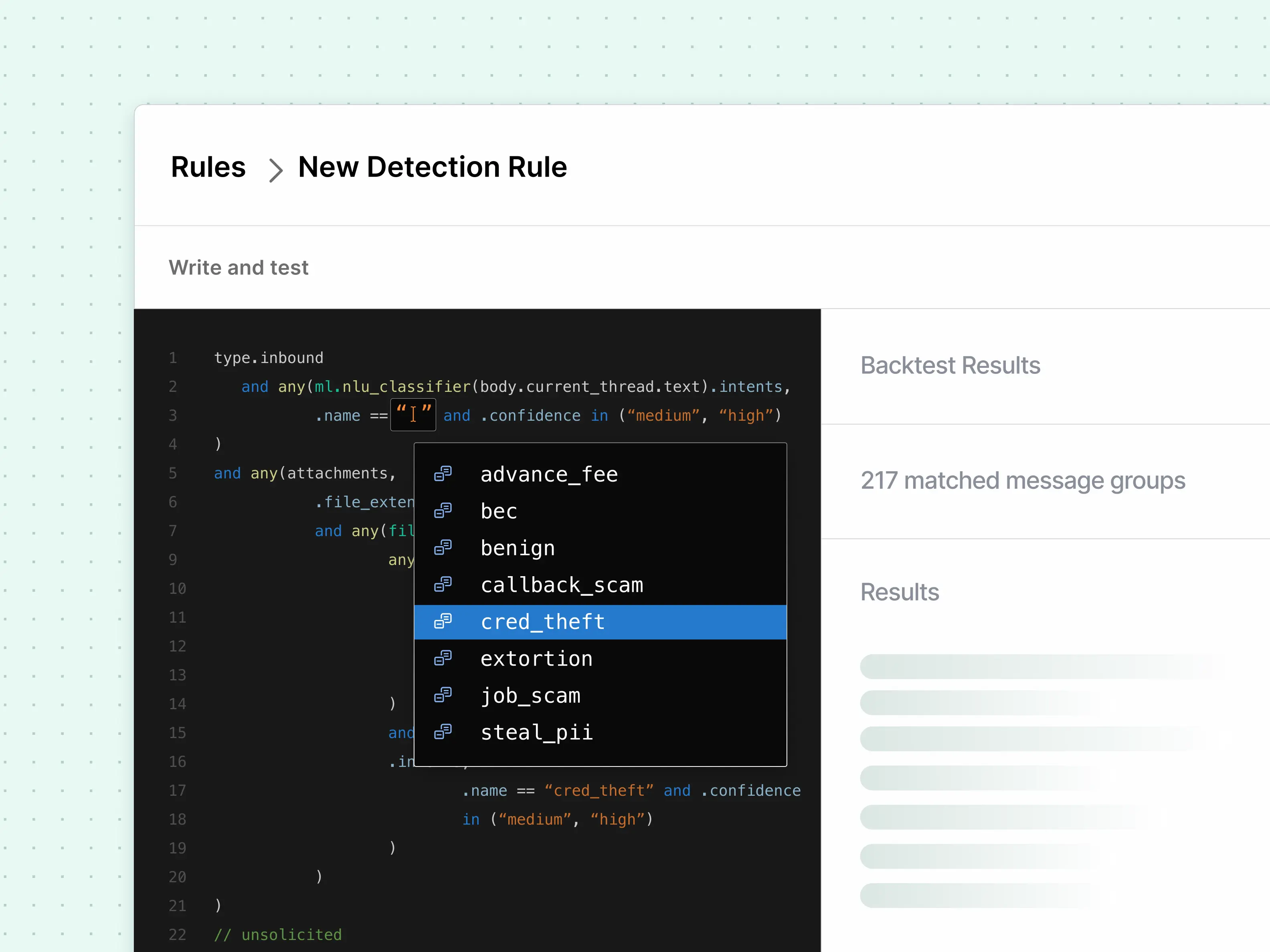
3. Automation that reduces workload without reducing visibility
Sublime is designed to reduce manual triage with automation that still preserves analyst understanding. The goal is fewer “busywork investigations,” faster remediation, and a repeatable loop that improves coverage when something new shows up.
4. Integrates into the security stack you already run
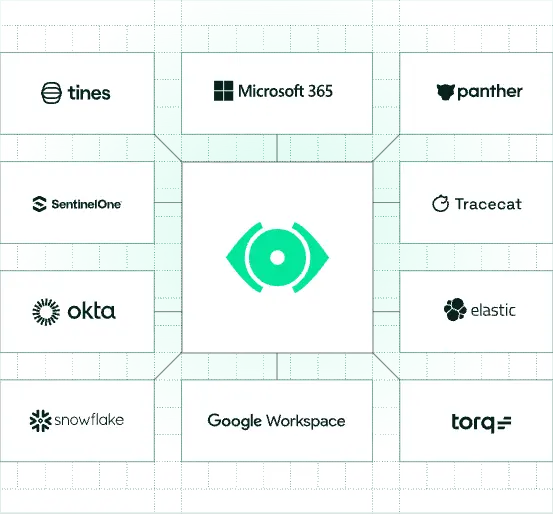
Email security should not be a silo. Sublime fits into SOC workflows with integrations and structured outputs that help teams move faster across SIEM, SOAR, and ticketing.
5. Faster adaptation when attackers change tactics
The modern threat landscape rewards speed. When a new attack appears, the winning capability is not only detection, but the ability to close the gap quickly and prevent repeats.
Frequently asked questions
Why do organizations look for Abnormal Security alternatives?
Many teams want more transparency, control, or automation beyond what Abnormal provides. Others want faster adaptability to new threats or a model that can be tailored to their own environment.
Is it easy to replace Abnormal with another platform?
Most modern platforms integrate via API, so migrating from Abnormal to another tool is generally straightforward. The complexity depends on your email provider, reporting workflows, and automation needs.
Do I need a second layer if I already use Microsoft Defender or Google Workspace?
Many organizations add a specialized layer to improve threat detection, reduce false positives, or gain deeper control over triage and investigation workflows.
How do I know if my current email security platform is not performing well?
High false positives, missed attacks, slow vendor response times, or opaque detection logic are common signs that it may be time to evaluate alternatives.
Get the latest
Sublime releases, detections, blogs, events, and more directly to your inbox.
.svg)
